You change one line in your Compose file, postgres:17 to postgres:18, and the database container dies the moment it starts. docker compose up -d reports success, and the only clue is a long message in the logs that begins with Error: in 18+, these Docker images are configured to store database data in a .... Mounting a fresh empty directory doesn’t help, and neither does a named volume.
Starting with PostgreSQL 18, the official Docker image sets
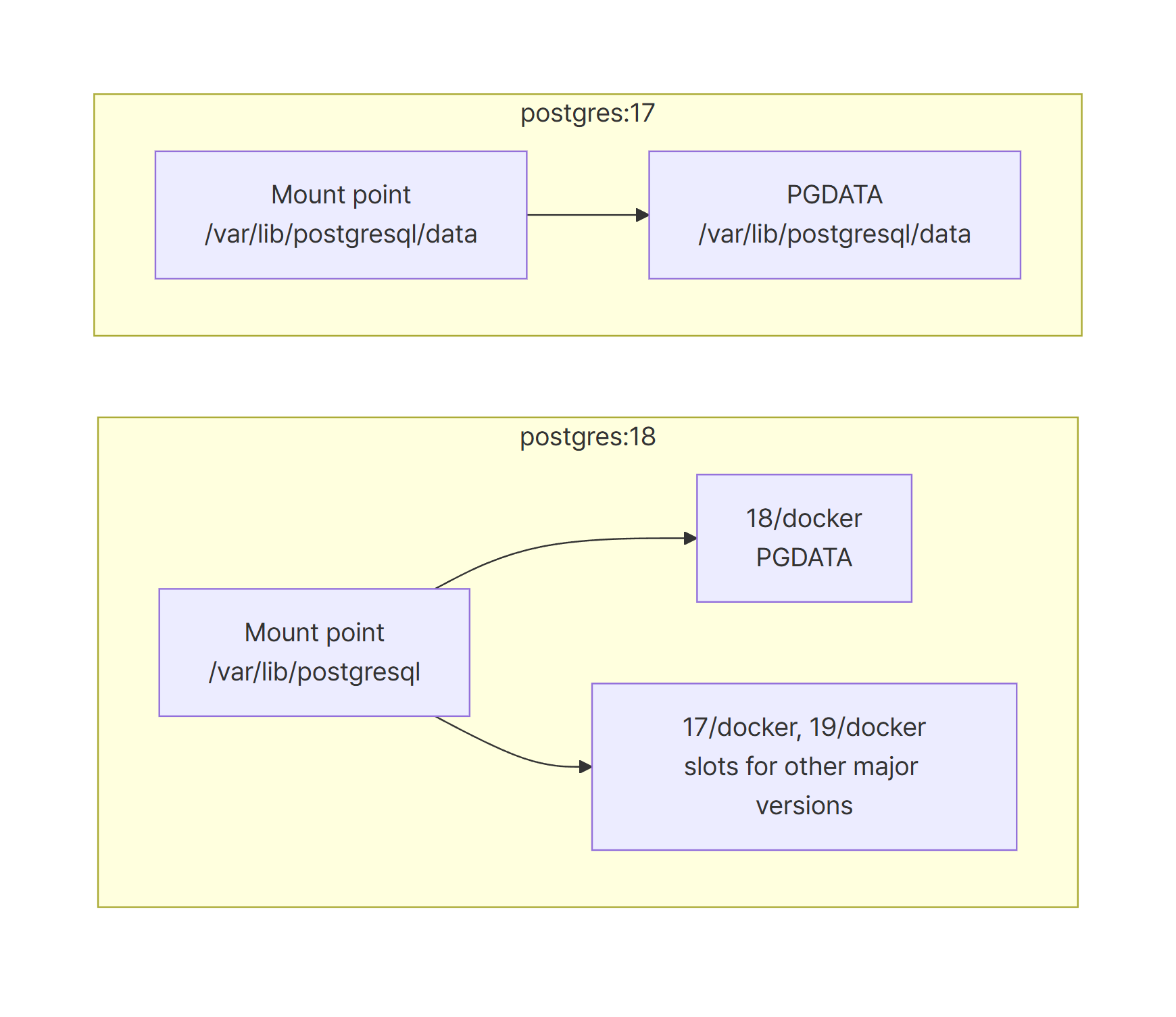
PGDATAto/var/lib/postgresql/18/dockerand declaresVOLUME /var/lib/postgresql.
If anything is mounted at/var/lib/postgresql/data, the entrypoint treats it as the old layout and refuses to start. Mount the volume at/var/lib/postgresqlinstead.
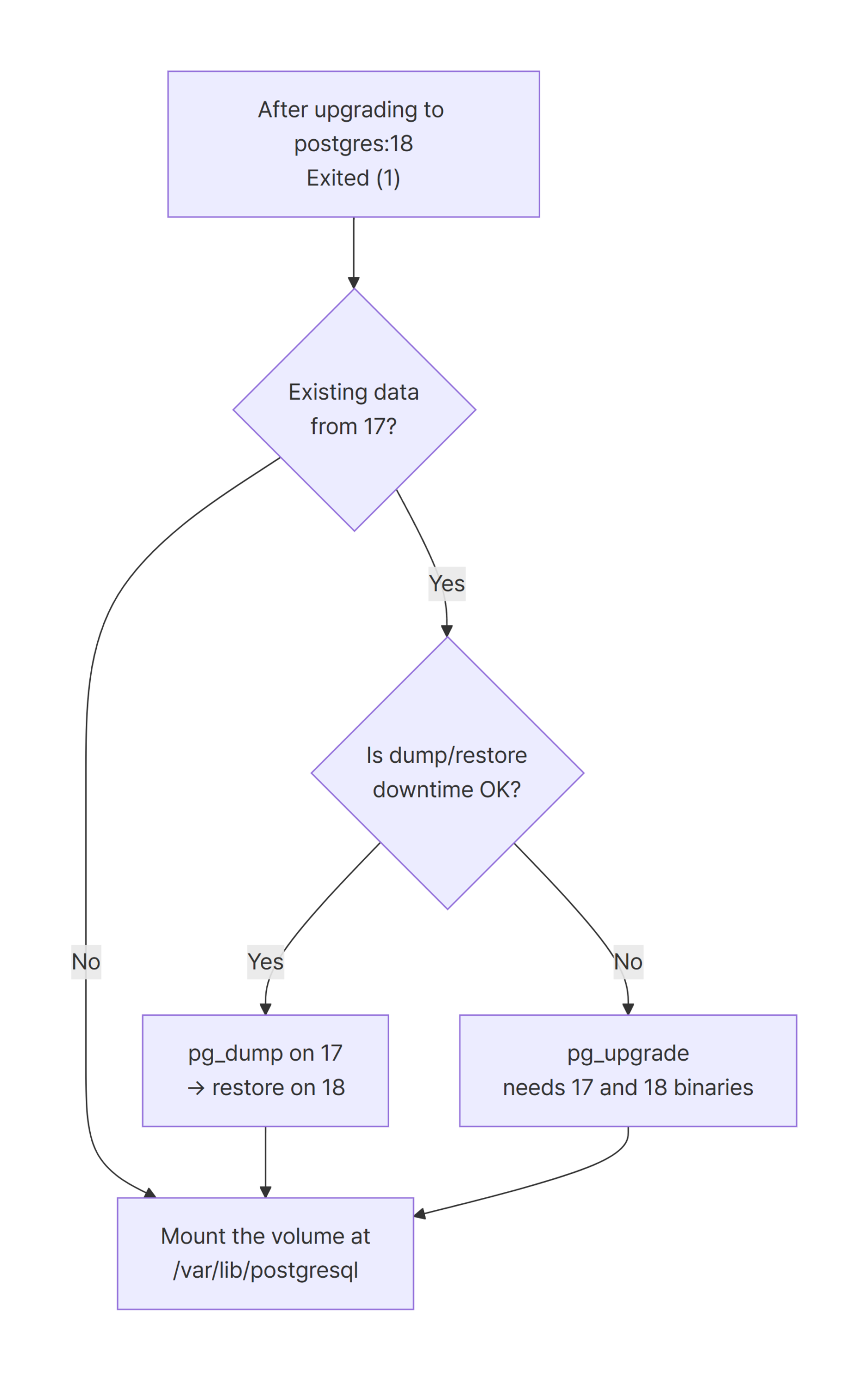
PostgreSQL 18 can’t open a data directory created by 17, so move the data withpg_dumpor runpg_upgrade.
Environment
I reproduced everything with Docker Compose alone. There’s no application code; all reads and writes go through psql.
| Item | Version |
|---|---|
| Docker Engine | 29.9.2 (Docker Desktop, WSL2) |
| Docker Compose | v5.6.1 |
| Original image | postgres:17.11 (17.11, Debian 13) |
| Upgrade target | postgres:18.6 (18.6, Debian 13) |
| Comparison image | postgres:18.0 (built 2025-11-04) |
Reproduce: switching the image to postgres:18 makes the container exit
Here’s a Compose file that worked fine on PostgreSQL 17. It bind-mounts the host’s ./pgdata to /var/lib/postgresql/data, which is a common setup.
name: docker-postgres-18-pgdata-volume-mount-error

# Before: the compose file that worked with PostgreSQL 17
services:
  db:
    image: postgres:17.11
    environment:
      POSTGRES_USER: app
      POSTGRES_PASSWORD: app
      POSTGRES_DB: app
    ports:
      - "55432:5432"
    volumes:
      - ./pgdata:/var/lib/postgresql/data
I started it on 17.11, inserted two rows into an orders table, and confirmed that the data directory is the mount path itself.
$ docker compose exec -T db psql -U app -d app -c "CREATE TABLE orders (id int PRIMARY KEY, qty int)" -c "INSERT INTO orders VALUES (1, 10), (2, 20)" -c "SHOW server_version" -c "SHOW data_directory" -c "TABLE orders"
CREATE TABLE
INSERT 0 2
         server_version
---------------------------------
 17.11 (Debian 17.11-1.pgdg13+2)
(1 row)

      data_directory
--------------------------
 /var/lib/postgresql/data
(1 row)
...
Next, I stopped the container and changed only image to postgres:18.6, leaving the volume line alone. docker compose up -d printed Started and exited with code 0. A moment later, the container was in Exited (1), and the reason only shows up in the logs.
$ docker compose -f compose.pg18-old-mount.yml logs db
db-1  | Error: in 18+, these Docker images are configured to store database data in a
db-1  |        format which is compatible with "pg_ctlcluster" (specifically, using
db-1  |        major-version-specific directory names).  This better reflects how
db-1  |        PostgreSQL itself works, and how upgrades are to be performed.
db-1  |
db-1  |        See also https://github.com/docker-library/postgres/pull/1259
db-1  |
db-1  |        Counter to that, there appears to be PostgreSQL data in:
db-1  |          /var/lib/postgresql/data
db-1  |
db-1  |        This is usually the result of upgrading the Docker image without
db-1  |        upgrading the underlying database using "pg_upgrade" (which requires both
db-1  |        versions).
...
docker compose up -d only starts the container. It doesn’t wait to see whether the entrypoint succeeds, so the command itself reports success even when the database never comes up. A CI job that checks only the exit code of up -d will miss this failure entirely.
An empty directory and a named volume fail the same way
It’s natural to blame the old 17 data. So I mounted an empty directory, ./pgdata18-empty, at the same path. The result didn’t change. The only difference is that the reported location now says (unused mount/volume).
$ docker compose -f compose.pg18-empty-old-mount.yml logs db
db-1  | Error: in 18+, these Docker images are configured to store database data in a
...
db-1  |        Counter to that, there appears to be PostgreSQL data in:
db-1  |          /var/lib/postgresql/data (unused mount/volume)
...
Switching to a named volume, pg18data:/var/lib/postgresql/data, gives the same outcome.
$ docker compose -f compose.pg18-named-old-mount.yml ps -a --format "{{.Service}} {{.Status}}" && docker compose -f compose.pg18-named-old-mount.yml logs db | head -9
db Exited (1) 7 seconds ago
db-1  | Error: in 18+, these Docker images are configured to store database data in a
...
db-1  |          /var/lib/postgresql/data (unused mount/volume)
In other words, the 18 image refuses to start whenever something is mounted at /var/lib/postgresql/data. Whether that mount holds data is irrelevant.
Cause: PGDATA moved to /var/lib/postgresql/18/docker in PostgreSQL 18
I compared the environment variables and the VOLUME declaration of both images.
$ for t in 17.11 18.6; do echo "--- postgres:$t"; docker image inspect postgres:$t --format "{{range .Config.Env}}{{println .}}{{end}}VOLUME={{json .Config.Volumes}}" | grep -E "^(PGDATA|PG_VERSION|VOLUME)="; done
--- postgres:17.11
PG_VERSION=17.11-1.pgdg13+2
PGDATA=/var/lib/postgresql/data
VOLUME={"/var/lib/postgresql/data":{}}
--- postgres:18.6
PG_VERSION=18.6-1.pgdg13+2
PGDATA=/var/lib/postgresql/18/docker
VOLUME={"/var/lib/postgresql":{}}
Up to 17, the cluster lived directly in /var/lib/postgresql/data. From 18 on, it lives in /var/lib/postgresql/18/docker, a path that includes the major version. The VOLUME the image declares moved one level up as well, to /var/lib/postgresql. The change came in with docker-library/postgres PR #1259, whose description says it aligns the image with the directory convention that pg_ctlcluster and postgresql-common already use.
So why does the image fail hard instead of quietly ignoring a mount at /var/lib/postgresql/data? The check lives in docker-entrypoint.sh inside the image.
$ docker run --rm --entrypoint grep postgres:18.6 -n -A12 "for d in" /usr/local/bin/docker-entrypoint.sh
250:		for d in /var/lib/postgresql /var/lib/postgresql/data /var/lib/postgresql/*/docker; do
251-			if [ -s "$d/PG_VERSION" ]; then
252-				OLD_DATABASES+=( "$d" )
253-			fi
254-		done
255-		if [ "${#OLD_DATABASES[@]}" -eq 0 ] && [ "$PG_MAJOR" -ge 18 ] && {
...
258-			mountpoint -q /var/lib/postgresql/data \
259-			|| awk '$5 == "/var/lib/postgresql/data" { found = 1 } END { exit !found }' /proc/self/mountinfo
260-		}; then
261-			OLD_DATABASES+=( '/var/lib/postgresql/data (unused mount/volume)' )
...
The entrypoint runs two checks:
- Lines 250–254: a
PG_VERSIONfile in any of the old locations marks that directory as data from a previous version. - Lines 255–261: even with no data anywhere, a mount point at
/var/lib/postgresql/datagets recorded as(unused mount/volume).
If either check hits, the script prints the message and exits with status 1. Without that guard, the cluster would be written to /var/lib/postgresql/18/docker, which you didn’t mount. The official image docs, written for 17 and below, warn that if you don’t mount a volume at the image’s declared VOLUME path, Docker creates an anonymous volume that isn’t reused when the container is recreated. In 18, that declared path is /var/lib/postgresql. You’d believe your data was safe in your volume while it actually sat in an anonymous one.
The runc mount error from issue #1364 didn’t reproduce here
Issue #1364, opened right after PostgreSQL 18 shipped, shows a different error: runc fails at container creation because it can’t mount onto /var/lib/postgresql/data. According to the description of docker-library/postgres commit 5ec8931, the early 18 images contained a symlink at /var/lib/postgresql/data that was there on purpose to break old setups. That commit, from 2025-10-15, removed the symlink and introduced the detection message you see today.
I couldn’t reproduce the runc error in this lab. The postgres:18.0 image I pulled for this lab was built on 2025-11-04, so it prints the same message as 18.6.
$ docker image inspect postgres:18.0 --format "{{.Created}} {{index .RepoDigests 0}}"
2025-11-04T04:13:15.75954301Z postgres@sha256:41fc5342eefba6cc2ccda736aaf034bbbb7c3df0fdb81516eba1ba33f360162c
I also built an image that restores the line the commit removed (ln -svT . /var/lib/postgresql/data). On Docker Engine 29.9.2, that image got through the mount without any error and ran initdb into /var/lib/postgresql/18/docker. If you still have an 18 image cached from before 2025-10-15, you may see the runc mount error from issue #1364 instead. Either way, the root cause is the same PGDATA change, and so is the fix.
Fix: mount the volume at /var/lib/postgresql
Move the mount point up one level. I used a new directory, ./pgdata18.
name: docker-postgres-18-pgdata-volume-mount-error

# After: mount the parent directory /var/lib/postgresql (18+)
services:
  db:
    image: postgres:18.6
    environment:
      POSTGRES_USER: app
      POSTGRES_PASSWORD: app
      POSTGRES_DB: app
    ports:
      - "55432:5432"
    volumes:
      - ./pgdata18:/var/lib/postgresql
The only change is the container-side path on the last line. Don’t set PGDATA yourself; let the image use its default of /var/lib/postgresql/18/docker. This is also what the error message recommends further down: “The suggested container configuration for 18+ is to place a single mount at /var/lib/postgresql …”.
$ docker compose -f compose.pg18.yml exec -T db psql -U app -d app -c "SHOW server_version" -c "SHOW data_directory"
        server_version
-------------------------------
 18.6 (Debian 18.6-1.pgdg13+2)
(1 row)

        data_directory
-------------------------------
 /var/lib/postgresql/18/docker
(1 row)
The version-specific subdirectory shows up on the host, too.
$ ls pgdata18 && ls pgdata18/18 && ls pgdata18/18/docker | head -5
18
docker
PG_VERSION
base
global
pg_commit_ts
pg_dynshmem
You could also mount directly at the PGDATA location, as in ./pgdata18:/var/lib/postgresql/18/docker. Several commenters on issue #1364 say that fixed it for them. The image maintainers in that same issue still recommend mounting /var/lib/postgresql, and the reason is the next major upgrade. The official image docs explain that mounting /var/lib/postgresql is what lets you use pg_upgrade --link. For that to work, the 17 and 18 directories must sit inside the same mount, so pg_upgrade --link never has to cross from one mount to another.
Pitfall: PostgreSQL 18 can’t read a 17 data directory
If you have real data from 17, changing the mount path isn’t enough. I tried the two shortcuts people usually reach for.
First, I mounted the old 17 directory ./pgdata at the new path, /var/lib/postgresql. The same message came back, this time pointing at /var/lib/postgresql. The 17 data files sit at the top of that directory, so the entrypoint flagged them as old data.
$ docker compose -f compose.pg18-mount-17data.yml logs db
db-1  | Error: in 18+, these Docker images are configured to store database data in a
...
db-1  |        Counter to that, there appears to be PostgreSQL data in:
db-1  |          /var/lib/postgresql
...
Second, I forced the old path by setting PGDATA: /var/lib/postgresql/data as an environment variable. That gets past the entrypoint check, but then the PostgreSQL server itself rejects the directory.
$ docker compose -f compose.pg18-pgdata-override.yml logs db
db-1  |
db-1  | PostgreSQL Database directory appears to contain a database; Skipping initialization
db-1  |
db-1  | 2026-10-27 09:12:57.040 UTC [1] FATAL:  database files are incompatible with server
db-1  | 2026-10-27 09:12:57.040 UTC [1] DETAIL:  The data directory was initialized by PostgreSQL version 17, which is not compatible with this version 18.6 (Debian 18.6-1.pgdg13+2).
The PostgreSQL docs explain that major versions may change the internal storage format. That’s why a major upgrade requires either a dump and restore or a conversion with pg_upgrade. Pointing 18 at the right path won’t make it open 17’s files.
Migrate 17 data with pg_dump
For a database of modest size, dump and restore is the simplest route. I brought the 17 container back up and dumped the app database.
$ docker compose exec -T db pg_dump -U app -d app -f /tmp/app.sql && docker compose cp db:/tmp/app.sql backup/app.sql && grep -A3 "^COPY" backup/app.sql
...
COPY public.orders (id, qty) FROM stdin;
1	10
2	20
\.
Then I stopped 17, started the fixed 18 setup, and restored the dump.
$ docker compose -f compose.pg18.yml exec -T db psql -U app -d app -v ON_ERROR_STOP=1 -q < backup/app.sql && docker compose -f compose.pg18.yml exec -T db psql -U app -d app -c "SHOW server_version" -c "TABLE orders"
...
        server_version
-------------------------------
 18.6 (Debian 18.6-1.pgdg13+2)
(1 row)

 id | qty
----+-----
  1 |  10
  2 |  20
(2 rows)
As a final check, I removed the container, recreated it, and queried again. down reports the container as Removed, up creates a new one (Created), and the rows are still there. That works because the volume covers the parent of the real PGDATA.
$ docker compose -f compose.pg18.yml down && docker compose -f compose.pg18.yml up -d --wait && until docker compose -f compose.pg18.yml exec -T db pg_isready -U app -d app -q; do sleep 1; done && docker compose -f compose.pg18.yml exec -T db psql -U app -d app -c "TABLE orders"
 Container docker-postgres-18-pgdata-volume-mount-error-db-1 Stopping
 Container docker-postgres-18-pgdata-volume-mount-error-db-1 Stopped
 Container docker-postgres-18-pgdata-volume-mount-error-db-1 Removing
 Container docker-postgres-18-pgdata-volume-mount-error-db-1 Removed
...
 Container docker-postgres-18-pgdata-volume-mount-error-db-1 Creating
 Container docker-postgres-18-pgdata-volume-mount-error-db-1 Created
...
 id | qty
----+-----
  1 |  10
  2 |  20
(2 rows)
In this lab I ran pg_dump from inside the 17 container. The PostgreSQL docs recommend using the newer version’s pg_dump and pg_dumpall when possible. pg_dump doesn’t include roles, so use pg_dumpall if you need to carry over roles and privileges. When the database is large enough that a dump takes too long, look at pg_upgrade instead. Keep in mind that pg_upgrade needs both the 17 and 18 binaries; docker-library/postgres issue #37 has a long discussion of how to do that with Docker. I didn’t run pg_upgrade for this post.
Pin the major version instead of using latest
One comment on issue #1364 describes a Kubernetes cluster running postgres:latest that jumped from 17.6 to 18 on its own and hit this exact problem. The moment a new major version ships, latest brings a different data format and different mount rules. For a database image, pin at least the major version.
| Tag example | What can change underneath you | When to use it |
|---|---|---|
postgres:latest |
Up to the major version | Never for a database |
postgres:18 |
Minor version (18.x) | You want minor patches automatically |
postgres:18.6 |
Image rebuilds only | Reproducibility in production and CI comes first |
According to the PostgreSQL docs, minor releases never change the internal storage format, so postgres:18 is safe as far as your data goes. As shown earlier, though, even a fixed tag like postgres:18.0 gets rebuilt later. If you want to lock down the entrypoint behavior as well, pin by digest (postgres@sha256:...).
Summary
- From
postgres:18on,PGDATAis/var/lib/postgresql/18/dockerand the declaredVOLUMEis/var/lib/postgresql. - Mount anything at
/var/lib/postgresql/dataand the 18.6 entrypoint printsError: in 18+, these Docker images are configured to store database data ...and exits. Empty directories and named volumes are no exception. - The fix is to mount the volume at
/var/lib/postgresqland leavePGDATAat its default. - PostgreSQL 18 can’t read a 17 data directory (
database files are incompatible with server). Move the data withpg_dumporpg_dumpall, or runpg_upgrade. - Don’t trust a successful
docker compose up -d. Check the container withpsandlogs.
References
- docker-library/postgres PR #1259 — Change PGDATA in 18+ to /var/lib/postgresql/MAJOR/docker
- docker-library/docs — postgres image documentation (PGDATA section)
- docker-library/postgres issue #1364 — PostgreSQL 18.0. Error on creation a new container with empty data
- docker-library/postgres commit 5ec8931 — Remove intentionally-breaking “data” symlink and add better detection
- docker-library/postgres — 18/trixie Dockerfile
- docker-library/postgres issue #37 — Upgrading between major versions?
- PostgreSQL 18 Documentation — Upgrading a PostgreSQL Cluster
- PostgreSQL 18 Documentation — pg_dumpall