You add B3__orders_baseline.sql to a database that already has V1 and V2 applied, and flyway info reports SQL_BASELINE | Pending. Run migrate anyway and Flyway actually executes the baseline script, which fails with table orders already exists. This only happens in Flyway 13.10.0 with Native Connectors mode turned on.
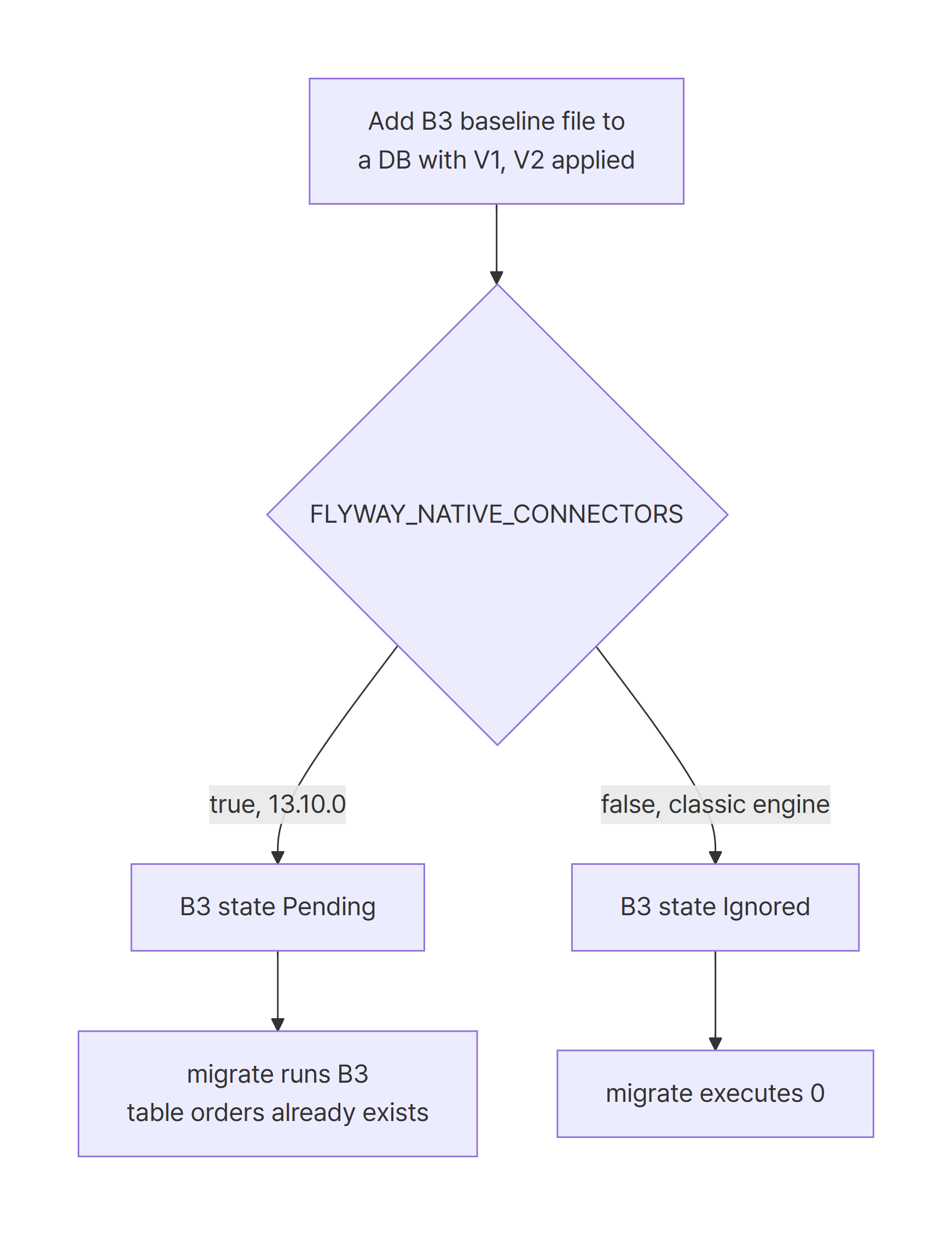
The 13.10.0 Native Connectors engine marks a baseline migration added to an existing database as
Pendinginstead ofIgnored.
The classic engine shows the same file asIgnoredon the same database, andmigrateruns nothing.
Upgrade to Flyway 13.11.1, or setFLYWAY_NATIVE_CONNECTORS=falseto fall back to the classic engine.
Environment
| Item | Version |
|---|---|
| JDK | 21.0.12.1 (Temurin) |
| Maven | 3.10.0 |
| Flyway (reproduction) | 13.10.0 |
| Flyway (fix verified) | 13.11.1 |
| SQLite JDBC | 3.53.4.0 (SQLite 3.53) |
| Spring Boot (comparison) | 4.1.1 (Flyway overridden to 13.10.0) |
Flyway OSS ships Native Connectors modules for four databases: SQLite, MongoDB, Cassandra, and Couchbase. Under org.flywaydb on Maven Central, those are the only flyway-database-nc-* modules. There is no Native Connectors module for PostgreSQL, so I reproduced this with a SQLite file database. The reproduction test in the fix PR for issue #4292 also uses SQLite.
Reproduce: a B3 baseline added to an existing database shows as Pending
Start with two migrations that are already applied in production. They live in migrations/step1.
V1__create_orders.sql creates the table, and V2__add_status.sql adds a column.
CREATE TABLE orders (
    id INTEGER PRIMARY KEY,
    item VARCHAR(100) NOT NULL
);
ALTER TABLE orders ADD COLUMN status VARCHAR(20);
Now assume the history has grown long, so you squash the final state up to V2 into a baseline migration to speed up new environments. The file is named B3 to match the reproduction in the issue. migrations/step2 holds V1, V2, and this B3 file.
CREATE TABLE orders (
    id INTEGER PRIMARY KEY,
    item VARCHAR(100) NOT NULL,
    status VARCHAR(20)
);
Everything runs through the Flyway Java API. FlywayRunner runs migrate or info against the given location and prints the state of each migration.
Flyway flyway = Flyway.configure()
        .dataSource("jdbc:sqlite:" + DB_FILE, "", "")
        .locations("filesystem:" + Path.of(args[1]).toAbsolutePath())
        .load();

if (command.equals("migrate")) {
    MigrateResult result = flyway.migrate();
    System.out.println("migrationsExecuted=" + result.migrationsExecuted);
}

printInfo(flyway);
Note that dataSource() receives a URL string. That detail is where the result diverges from Spring Boot later on. The dependencies are flyway-core plus flyway-database-nc-sqlite, flyway-nc-scanners, flyway-verb-info, and flyway-verb-migrate.
With Native Connectors on, I applied V1 and V2 from step1, then ran info against step2.
FLYWAY_NATIVE_CONNECTORS=true mvn -B exec:java -Dexec.args="info migrations/step2"
[com.example.flywaync.FlywayRunner.main()] INFO org.flywaydb.core.internal.logging.PreviewFeatureWarning - You are using a preview feature 'Native Connectors for SQLite'.
...
[com.example.flywaync.FlywayRunner.main()] INFO org.flywaydb.nc.utils.VerbUtils - Database: ******** (SQLite 3.53)
1        | create orders        | SQL              | Success
2        | add status           | SQL              | Success
3        | orders baseline      | SQL_BASELINE     | Pending
The Native Connectors for SQLite preview warning tells you the Native Connectors engine is in charge. Pending on B3 means the next migrate will try to run it.
Same database, same files, but with FLYWAY_NATIVE_CONNECTORS=false for the classic engine, and the result changes.
1        | create orders        | SQL              | Success
2        | add status           | SQL              | Success
3        | orders baseline      | SQL_BASELINE     | Ignored
| Engine (13.10.0) | B3 state | Next migrate |
|---|---|---|
| Native Connectors | Pending |
Tries to run B3 |
| Classic engine | Ignored |
0 migrations executed |
Running migrate executes the baseline: table orders already exists
Pending isn’t just a display issue. Run migrate in Native Connectors mode and Flyway executes B3 for real.
[com.example.flywaync.FlywayRunner.main()] INFO org.flywaydb.verb.migrate.MigrateVerbExtension - Current version of schema "main": 2
[com.example.flywaync.FlywayRunner.main()] INFO org.flywaydb.verb.migrate.migrators.JdbcMigrator - Migrating schema "main" to version "3 - orders baseline"
[com.example.flywaync.FlywayRunner.main()] ERROR org.flywaydb.verb.migrate.migrators.JdbcMigrator - Migration of schema "main" to version "3 - orders baseline" failed! Changes successfully rolled back.
[WARNING]
org.flywaydb.core.internal.exception.FlywayMigrateException: Failed to execute script B3__orders_baseline.sql
------------------------------------------------
SQL State  : null
Error Code : 1
Message    : [SQLITE_ERROR] SQL error or missing database (table orders already exists)
The schema is already at version 2, and Flyway replays a script holding the full state up to V2, so CREATE TABLE fails. In this example the first statement fails and the change rolls back, so nothing is damaged. A baseline script with CREATE TABLE IF NOT EXISTS or data INSERT statements is a different story. The early statements can succeed and push unintended changes into an existing database. Both the issue and the fix PR call out this risk.
Cause: the Native Connectors state calculator ignores existing history
The Flyway documentation sets the rule for baseline migrations: they are only used when deploying to a new environment, and they are ignored in environments that already have Flyway migrations applied. The classic engine follows that rule and leaves B3 as Ignored.
Fix PR #4291, linked from issue #4292, points to CoreMigrationStateCalculator on the Native Connectors side. In 13.10.0, when this code meets a baseline file at the baseline version, it checks only two things. Is the migration type a baseline, and has the schema already been baselined? It never asks whether the schema history table already contains applied migrations. The PR adds a condition that returns PENDING only when the history is empty.
Mapping that onto the reproduction:
- This database has no
<< Flyway Baseline >>row, because V1 and V2 were applied withmigrate - So the "schema already baselined" condition doesn’t match
- With no check for existing history, B3 is treated as if the database were new, and it becomes
Pending
Next, look at what turns Native Connectors mode on. In 13.10.0, NativeConnectorsModeUtils checks whether the FLYWAY_NATIVE_CONNECTORS environment variable is true. NativeConnectorsSupportImpl skips Native Connectors when the configuration has no URL. That second rule changes things under Spring Boot.
I opened the same database through Spring Boot 4.1.1 auto-configuration, with Flyway overridden to 13.10.0 and the environment variable set to true.
spring.datasource.url=jdbc:sqlite:../data/app.db
spring.flyway.locations=filesystem:../migrations/step2
2026-10-25T16:47:10.953+09:00  INFO 2276 --- [           main] org.flywaydb.core.FlywayExecutor         : Database: jdbc:sqlite:******** (SQLite 3.53)
2026-10-25T16:47:10.997+09:00  INFO 2276 --- [           main] o.f.core.internal.command.DbValidate     : Successfully validated 3 migrations (execution time 00:00.016s)
...
FLYWAY_NATIVE_CONNECTORS=true
configuration.getUrl()=null
...
3        | orders baseline      | SQL_BASELINE     | Ignored
There’s no PreviewFeatureWarning, and the classic engine’s DbValidate ran instead. FlywayAutoConfiguration in Spring Boot 4.1.1 passes a DataSource object through configuration.dataSource(DataSource). As a result getUrl() is null, and Flyway doesn’t switch to Native Connectors even with the environment variable set. The paths that hit this bug are the Java API with a URL connection and the CLI.
Fix: upgrade to Flyway 13.11.1 or turn off Native Connectors
The Flyway release notes list the fix for Issue 4292 under 13.10.1. The entry describes a bug where, in Native Connectors mode, a baseline script on a database that already had migrations applied showed as Pending instead of Ignored. Maven Central has no 13.10.1; it has 13.10.2, 13.10.3, 13.11.0, and 13.11.1. I verified the fix with 13.11.1.
In the lab, a Maven profile swaps only the version.
<properties>
    <maven.compiler.release>21</maven.compiler.release>
    <project.build.sourceEncoding>UTF-8</project.build.sourceEncoding>
    <!-- 13.10.0: bug reproduced (flyway/flyway#4292) -->
    <flyway.version>13.10.0</flyway.version>
</properties>

<profiles>
    <profile>
        <!-- mvn -Pfixed ... : release that contains the fix -->
        <id>fixed</id>
        <properties>
            <flyway.version>13.11.1</flyway.version>
        </properties>
    </profile>
</profiles>
Make sure flyway-database-nc-sqlite, flyway-nc-scanners, and the flyway-verb-* modules use the same ${flyway.version} as flyway-core. The state calculation code that the PR fixed lives in flyway-nc-core, which comes in transitively with flyway-database-nc-sqlite. Don’t bump only the modules you declare. Run mvn dependency:list and confirm every org.flywaydb module is on the same version.
On 13.11.1, I applied V1 and V2 to an empty database, then ran step2 again in Native Connectors mode.
[com.example.flywaync.FlywayRunner.main()] INFO org.flywaydb.core.internal.logging.PreviewFeatureWarning - You are using a preview feature 'Native Connectors for SQLite'.
...
[com.example.flywaync.FlywayRunner.main()] INFO org.flywaydb.verb.migrate.MigrateVerbExtension - Schema "main" is up to date. No migration necessary.
migrationsExecuted=0
Version  | Description          | Type             | State
1        | create orders        | SQL              | Success
2        | add status           | SQL              | Success
3        | orders baseline      | SQL_BASELINE     | Ignored
The Native Connectors engine is still active, B3 is Ignored, and migrate runs nothing.
If you can’t upgrade yet, switch back to the classic engine. This is migrate on 13.10.0 with FLYWAY_NATIVE_CONNECTORS=false.
[com.example.flywaync.FlywayRunner.main()] INFO org.flywaydb.core.internal.command.DbMigrate - Schema "main" is up to date. No migration necessary.
migrationsExecuted=0
...
3        | orders baseline      | SQL_BASELINE     | Ignored
According to the release notes, the fix starts at 13.10.1. Since 13.10.1 isn’t on Maven Central, 13.10.2 is the first version you can actually download. In the lab I only verified 13.11.1.
Use this table to pick an option.
| Situation | Choice |
|---|---|
| You run Native Connectors through the Java API or CLI | Upgrade to 13.10.2 or later, preferably 13.11.1 |
| You must add the baseline file before you can upgrade | Use the classic engine with FLYWAY_NATIVE_CONNECTORS=false |
| You only run Flyway through Spring Boot 4.1.1 auto-configuration | This path isn’t affected (classic engine, verified on 4.1.1) |
The release notes also say Native Connectors became the default for Cassandra. On a database like that, Native Connectors can be active without setting the environment variable, so check your version first. If your deployment pipeline already runs flyway info, add a step that checks for a Pending line right after you add a new baseline file.
Why baseline migrations behave differently on new and existing databases
Baseline migrations exist to stand up new environments quickly. By the documented rules, an empty database starts from the latest baseline and skips versioned migrations below it. On 13.11.1, I applied step2 as-is to an empty database.
[com.example.flywaync.FlywayRunner.main()] INFO org.flywaydb.verb.migrate.migrators.JdbcMigrator - Migrating schema "main" to version "3 - orders baseline"
[com.example.flywaync.FlywayRunner.main()] INFO org.flywaydb.verb.migrate.MigrateVerbExtension - Successfully applied 1 migration to schema "main", now at version v3 (execution time 00:00.007s)
migrationsExecuted=1
Version  | Description          | Type             | State
1        | create orders        | SQL              | Below Baseline
2        | add status           | SQL              | Below Baseline
3        | orders baseline      | SQL_BASELINE     | Baseline
Only B3 runs, and V1 and V2 stay Below Baseline. The same set of files leaves B3 Ignored on an existing database and runs only B3 on a new one.
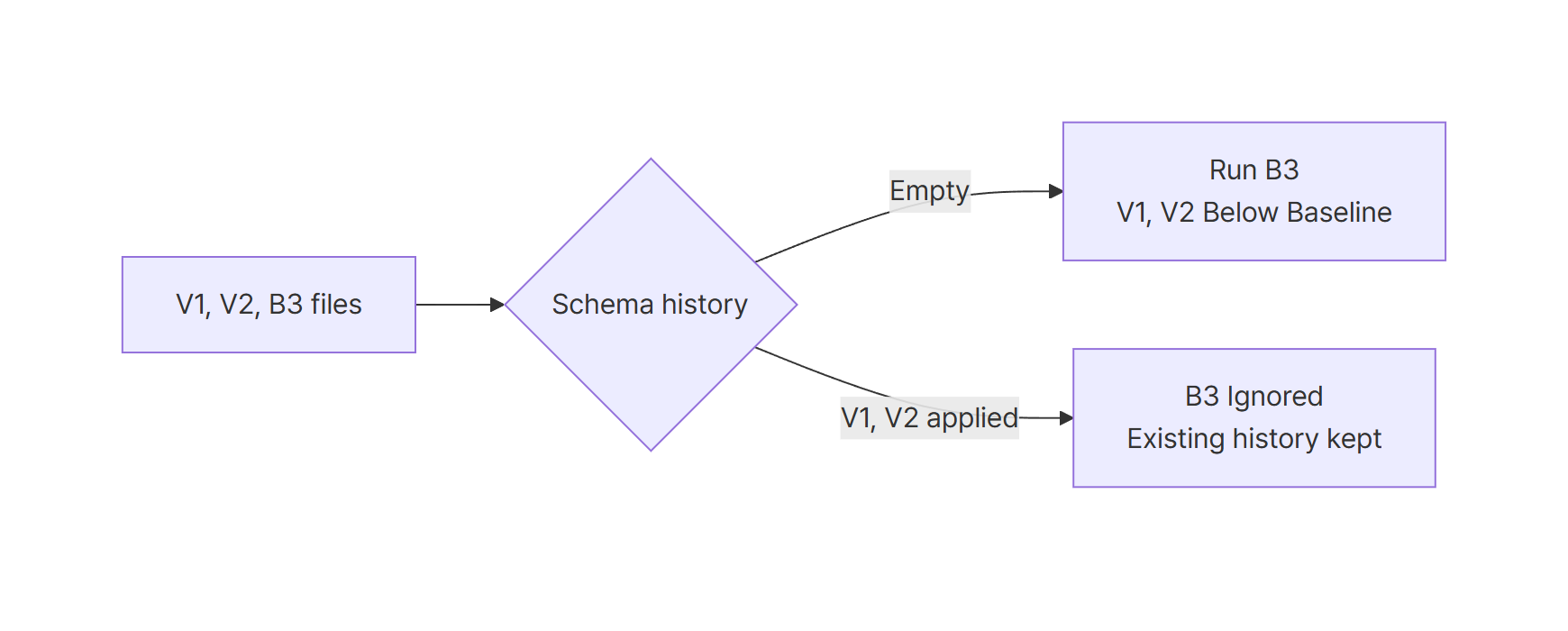
The 13.10.0 Native Connectors bug comes from failing to tell these two branches apart. When you add a baseline file, these rules keep you safe:
- The version in a baseline file name is the state that file represents. In the documentation’s example,
B5__my_database.sqlmeans the state after V5 is applied. This post uses B3 to match the reproduction in the issue - Assume the baseline script contains statements that break if run against an existing database, and check the
infooutput before pointing it at production - Don’t delete your versioned migration files. The documentation says baseline migrations don’t replace versioned migrations
Summary
- In Flyway 13.10.0 Native Connectors mode, a baseline migration added to a database with history shows as
Pending - Running
migratethen executes the baseline script, which failed here withtable orders already exists - On the same database, the classic engine shows it as
Ignoredand runs nothing - In 13.11.1 it’s
Ignoredeven in Native Connectors mode. If you can’t upgrade, useFLYWAY_NATIVE_CONNECTORS=false - Spring Boot 4.1.1 auto-configuration passes a
DataSourceobject, leaves the URL empty, and doesn’t use Native Connectors
References
- flyway/flyway #4292 New baseline migration shows as Pending on a database that already has migrations (native connectors)
- flyway/flyway PR #4291 New baseline file should be skipped on a database that already has migrations
- Release notes for Flyway Engine (Redgate)
- Baseline migrations (Redgate Flyway Documentation)
- NativeConnectorsModeUtils.java (flyway-13.10.0)
- NativeConnectorsSupportImpl.java (flyway-13.10.0)
- FlywayAutoConfiguration.java (Spring Boot v4.1.1)
- Maven Central: org.flywaydb artifacts
- Maven Central: org.flywaydb:flyway-core versions