Tool calling code that worked on Spring AI 1.x goes quiet after the upgrade to 2.0. You pass @Tool methods to ChatModel.call(), the tool method is never invoked, and the answer comes back as an empty string. Before you even get that far, the same code can fail with java.lang.IllegalArgumentException: model cannot be null or empty.
Spring AI 2.0 removed the internal tool execution loop from every
ChatModelimplementation, soChatModel.call()returns the rawtool_callsresponse.
Switch toChatClientin most cases. Its auto-registeredToolCallingAdvisorruns the tools and calls the model again.
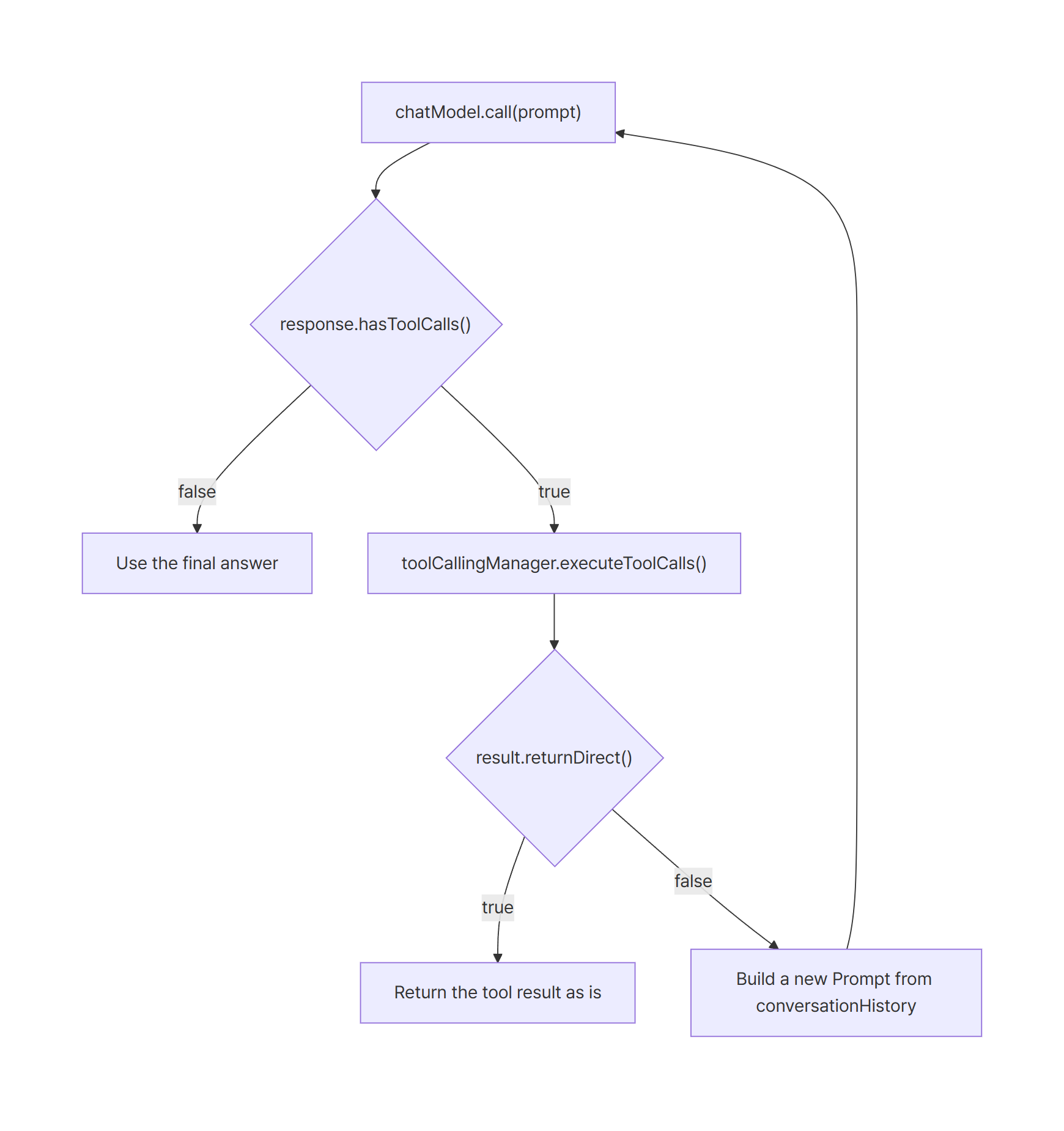
If you must keepChatModel, checkhasToolCalls()and drive the loop yourself withToolCallingManager.executeToolCalls().
Environment
I ran the same code on Spring AI 1.1.8 and on Spring AI 2.0.2 and compared the output. The LLM is qwen3:4b on a local Ollama server. It’s a small model that supports tool calling, so you can reproduce everything without a paid API key.
| Item | Version |
|---|---|
| Spring Boot (reproduce and fix) | 4.1.2 |
| Spring AI (reproduce and fix) | 2.0.2 |
| Spring Boot (1.x comparison) | 3.5.16 |
| Spring AI (1.x comparison) | 1.1.8 |
| Ollama | 0.40.11 |
| Model | qwen3:4b |
| JDK | 21.0.12.1 (Temurin) |
| Maven | 3.10.0 |
Every run is a CommandLineRunner that makes one call and exits, with no web server. The lab has three Maven projects: ai1 (Spring AI 1.1.8), ai2 (Spring AI 2.0.2, with a --demo.mode switch for each scenario), and ai2-flag (a compile check for the removed option). Whether the tool actually ran is decided by a single line the tool method prints.
Reproduce: the 1.x code runs the tool, 2.0.2 breaks it twice
The sample tool: look up an order’s shipping status
The tool returns a value the model can’t know on its own. When it runs, it prints >>> TOOL EXECUTED.
public class OrderTools {

    @Tool(description = "Look up the shipping status of an order by order id")
    public String getOrderStatus(@ToolParam(description = "Order id, e.g. ORD-1001") String orderId) {
        System.out.println(">>> TOOL EXECUTED: getOrderStatus(" + orderId + ")");
        return "Order " + orderId + " is SHIPPED. Expected delivery date: 2026-10-28.";
    }
}
The question is fixed: What is the shipping status of order ORD-1001? Answer in one sentence. Without the tool, the model has no way to come up with the date 2026-10-28, so the date in the answer proves the tool result reached the model.
Spring AI 1.1.8: the tool runs inside ChatModel.call()
This is the common 1.x pattern. You put the tools in ToolCallingChatOptions and pass them straight to ChatModel.call().
// Spring AI 1.x style: pass tools to ChatModel directly
ToolCallback[] tools = ToolCallbacks.from(new OrderTools());
ChatOptions options = ToolCallingChatOptions.builder()
        .toolCallbacks(tools)
        .build();

ChatResponse response = chatModel.call(new Prompt(QUESTION, options));

System.out.println("hasToolCalls = " + response.hasToolCalls());
System.out.println("toolCalls    = " + response.getResult().getOutput().getToolCalls());
System.out.println("answer       = [" + response.getResult().getOutput().getText() + "]");
Here is the output on Spring Boot 3.5.16 with Spring AI 1.1.8.
$ cd ai1 && mvn -B -q -Dmaven.repo.local=../.tools/m2/repository spring-boot:run
...
>>> TOOL EXECUTED: getOrderStatus(ORD-1001)
hasToolCalls = false
toolCalls    = []
answer       = [The shipping status of order ORD-1001 is SHIPPED with an expected delivery date of 2026-10-28.]
The tool ran inside a single call(), and the model used its result to write the final answer. The caller never sees the tool_calls step, which is why hasToolCalls is false.
First failure on 2.0.2: model cannot be null or empty
Move the same code to Spring Boot 4.1.2 with Spring AI 2.0.2 and it throws before any tool is involved.
$ cd ai2 && mvn -B -q -Dmaven.repo.local=../.tools/m2/repository spring-boot:run -Dspring-boot.run.arguments=--demo.mode=legacy
...
mode = legacy, default model = qwen3:4b
...
java.lang.IllegalArgumentException: model cannot be null or empty
	at org.springframework.ai.ollama.OllamaChatModel.verifyPromptChatOptions(OllamaChatModel.java:370) ~[spring-ai-ollama-2.0.2.jar:2.0.2]
	at org.springframework.ai.ollama.OllamaChatModel.call(OllamaChatModel.java:218) ~[spring-ai-ollama-2.0.2.jar:2.0.2]
	at com.example.tooldemo.ToolDemoApplication.legacy(ToolDemoApplication.java:50) ~[classes/:na]
The default model is set to qwen3:4b in application.properties, and the app prints default model = qwen3:4b right before the call. The exception still says the model is empty.
The 2.0 upgrade notes explain why. ChatModel.call(Prompt) doesn’t merge options. If the Prompt carries options, it uses them as they are; it falls back to the model’s default options only when the prompt has none. The code passes a ToolCallingChatOptions object with no model name, so the model ends up empty.
Second symptom on 2.0.2: hasToolCalls=true and an empty answer
Fix the options next. Copy the model’s default options with mutate() and add only the tools.
// Options fixed: start from the model defaults. Tools are sent, but not executed in 2.0
void chatModelOnly(OllamaChatModel chatModel) {
    ToolCallback[] tools = ToolCallbacks.from(new OrderTools());
    ChatOptions options = chatModel.getOptions().mutate()
            .toolCallbacks(tools)
            .build();

    ChatResponse response = chatModel.call(new Prompt(QUESTION, options));
    printResponse(response);
}
This time the app exits without an exception, but the output doesn’t match 1.1.8.
$ cd ai2 && mvn -B -q -Dmaven.repo.local=../.tools/m2/repository spring-boot:run -Dspring-boot.run.arguments=--demo.mode=chatmodel
...
mode = chatmodel, default model = qwen3:4b
hasToolCalls = true
toolCalls    = [ToolCall[id=call_ukcwzahh, type=function, name=getOrderStatus, arguments={"orderId":"ORD-1001"}]]
answer       = []
There’s no >>> TOOL EXECUTED line, so the tool never ran. The model asked for getOrderStatus with {"orderId":"ORD-1001"}, and that request was handed back to the caller unchanged. The text answer is an empty string.
This is the most dangerous state of the three. The code compiles and throws nothing. Users see a blank answer, and the logs contain no error to search for.
internalToolExecutionEnabled(false) no longer compiles
Some 1.x code turned off the internal loop so it could run tools itself. On 2.0.2 that code doesn’t compile.
// Spring AI 1.x: opt out of the internal loop to run tools yourself
static ChatOptions userControlled() {
    return ToolCallingChatOptions.builder()
            .toolCallbacks(ToolCallbacks.from(new OrderTools()))
            .internalToolExecutionEnabled(false)
            .build();
}
$ cd ai2-flag && mvn -B -q -Dmaven.repo.local=../.tools/m2/repository compile
[ERROR] COMPILATION ERROR :
[ERROR] /home/user/project/ai2-flag/src/main/java/com/example/tooldemo/LegacyOptions.java:[13,17] cannot find symbol
  symbol:   method internalToolExecutionEnabled(boolean)
  location: interface org.springframework.ai.model.tool.ToolCallingChatOptions.Builder<capture#1 of ?>
This one is the lucky case, because the compiler points at the exact line that changed. Delete the call and move on. In 2.0, ChatModel never executes tools, so there is nothing left to switch off.
Cause: Spring AI 2.0 removed the ChatModel internal tool execution loop
In Spring AI 1.x, each ChatModel implementation carried its own tool execution loop. When a response contained tool_calls, it ran the tools, appended the results, and called the model again until it got a plain answer. That’s why one call() was enough to get the final text.
GitHub issue #6251 removed that loop from every implementation: OpenAI, Anthropic, Ollama, DeepSeek, Bedrock, MiniMax, Mistral, and Google GenAI. The upgrade notes say that in 2.0, ChatModel.call() and ChatModel.stream() return the model’s raw response and don’t execute tool calls automatically.
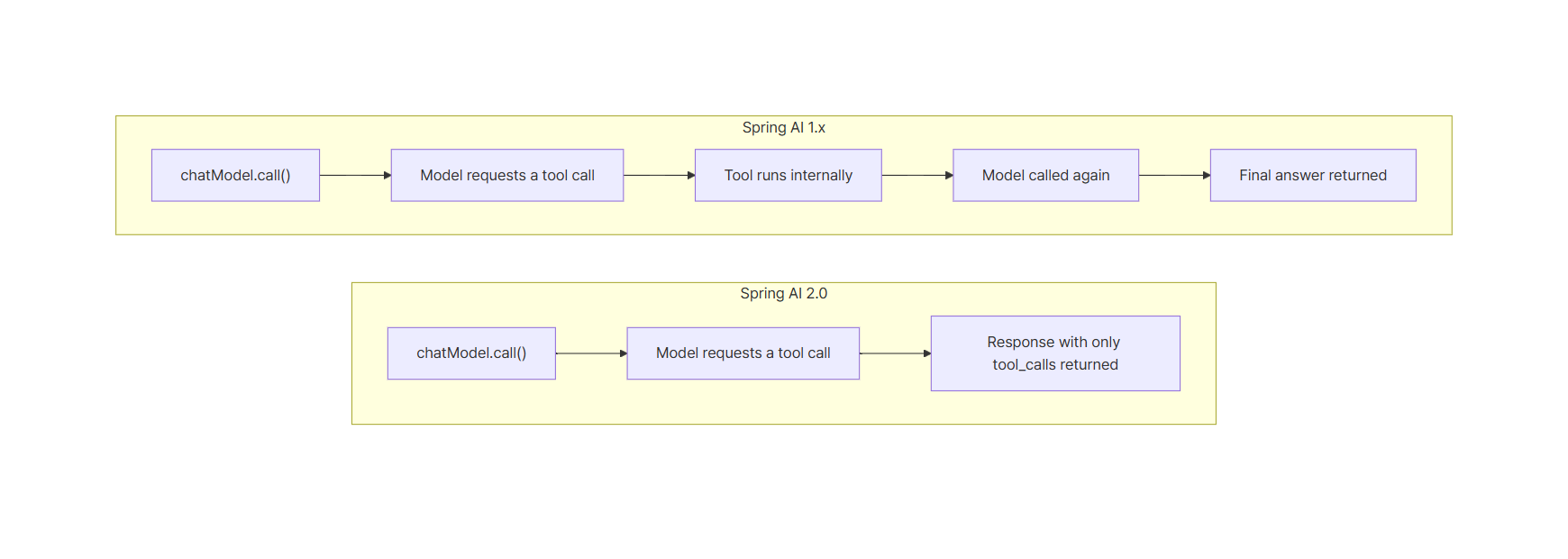
Tool execution moved to two places:
ToolCallingAdvisorinChatClient: the recommended path. It’s registered automatically when the request has tools- A caller-driven loop: when you have to use
ChatModeldirectly, the caller runs the loop withToolCallingManager
A few things were removed along with the loop. The internalToolExecutionEnabled option on ToolCallingChatOptions is gone, and so is the Spring Boot property spring.ai.<provider>.chat.internal-tool-execution-enabled. The compiler won’t catch the property if it’s still in application.yml, so search your configuration files for it during the upgrade.
Fix: switch to ChatClient or drive the loop with ToolCallingManager
You have two options. Fix 1 covers most code. Use Fix 2 only when you really need to call ChatModel directly.
Fix 1: ChatClient lets ToolCallingAdvisor run the loop
If the tools are called from regular application code, switching to ChatClient is the shortest change. Inject the ChatClient.Builder that Spring Boot auto-configuration provides.
// Fix 1: ChatClient auto-registers ToolCallingAdvisor
void chatClient(ChatClient.Builder chatClientBuilder) {
    ChatClient chatClient = chatClientBuilder.build();

    String answer = chatClient.prompt(QUESTION)
            .tools(new OrderTools())
            .call()
            .content();

    System.out.println("answer       = [" + answer + "]");
}
You pass the @Tool object directly to .tools(new OrderTools()). There’s no need for ToolCallbacks.from() or an options object, and the code doesn’t add ToolCallingAdvisor by hand.
$ cd ai2 && mvn -B -q -Dmaven.repo.local=../.tools/m2/repository spring-boot:run -Dspring-boot.run.arguments=--demo.mode=chatclient
...
mode = chatclient, default model = qwen3:4b
>>> TOOL EXECUTED: getOrderStatus(ORD-1001)
answer       = [The shipping status of order ORD-1001 is SHIPPED with an expected delivery date of 2026-10-28.]
The tool ran, and the answer matches the 1.1.8 output word for word. The code also didn’t set a model name anywhere. According to the upgrade notes, ChatClient merges request options with the model’s default options. Unlike a direct ChatModel call, you don’t have to worry about model cannot be null or empty here.
One thing to watch when you migrate. Spring AI 2.0 renamed ToolCallAdvisor to ToolCallingAdvisor. If you rename the class and leave it in .advisors(), the upgrade notes say it overlaps with the auto-registered one and ends up in the chain twice. Remove the explicit registration.
Fix 2: keep ChatModel and drive the loop with ToolCallingManager
Some code has to talk to ChatModel directly. Examples are a custom orchestrator, or a flow that needs an approval step before any tool runs. In that case, move the loop that used to live inside the model into the caller.
// Fix 2: keep ChatModel and drive the loop with ToolCallingManager
void manualLoop(OllamaChatModel chatModel, ToolCallingManager toolCallingManager) {
    ToolCallback[] tools = ToolCallbacks.from(new OrderTools());
    ChatOptions options = chatModel.getOptions().mutate()
            .toolCallbacks(tools)
            .build();

    Prompt prompt = new Prompt(QUESTION, options);
    ChatResponse response = chatModel.call(prompt);
The options start from the model defaults, the same way as in the second reproduction step. The sample injects the concrete OllamaChatModel type so it can chain toolCallbacks() right after getOptions().mutate(). With another provider, use that provider’s ChatModel and options types.
    int round = 1;
    while (response.hasToolCalls()) {
        System.out.println("round " + round++ + " toolCalls = " + response.getResult().getOutput().getToolCalls());
        ToolExecutionResult result = toolCallingManager.executeToolCalls(prompt, response);
        if (result.returnDirect()) {
            System.out.println("returnDirect = " + result.conversationHistory());
            return;
        }
        prompt = new Prompt(result.conversationHistory(), options);
        response = chatModel.call(prompt);
    }

    printResponse(response);
}
Three lines do the real work:
response.hasToolCalls(): checks whether the model asked for at least one tooltoolCallingManager.executeToolCalls(prompt, response): finds and runs the requested tools, then returns the conversation history with the tool call and its result appended to the original messagesnew Prompt(result.conversationHistory(), options): calls the model again with that history
Spring Boot auto-configuration registers ToolCallingManager as a bean, so you can inject it. When every tool that was called is marked @Tool(returnDirect = true), result.returnDirect() is true. In that case the loop exits without calling the model again.
$ cd ai2 && mvn -B -q -Dmaven.repo.local=../.tools/m2/repository spring-boot:run -Dspring-boot.run.arguments=--demo.mode=manual
...
mode = manual, default model = qwen3:4b
round 1 toolCalls = [ToolCall[id=call_vtpctyq7, type=function, name=getOrderStatus, arguments={"orderId":"ORD-1001"}]]
>>> TOOL EXECUTED: getOrderStatus(ORD-1001)
hasToolCalls = false
toolCalls    = []
answer       = [The shipping status of order ORD-1001 is SHIPPED with an expected delivery date of 2026-10-28.]
The first response contained a tool call request, and the loop ran once to execute the tool. The second response has hasToolCalls = false and carries the final answer. Compare it with the chatmodel run above: the model requests the same tool with the same arguments (only the call id differs), and the only difference is that the caller now acts on that request.
The official tool calling docs warn that a hand-written loop bypasses observability and advisor composition. Unless you have a clear reason to own the loop, pick Fix 1.
Pitfalls: what changes without a compile error
Which fix to choose
| Situation | Choice |
|---|---|
| Tool calls from regular service code | Fix 1: ChatClient |
| You also need memory or observability advisors | Fix 1: ChatClient |
| Approval before tool execution, sending step-by-step progress | Fix 2, or ChatClient + AdvisorParams.toolCallingAdvisorAutoRegister(false) |
| Custom orchestrator, library internals | Fix 2: ToolCallingManager loop |
Upgrade checklist
- Find every place that passes tools to
ChatModel.call(). Those calls compile, throw nothing, and return an empty answer ChatModel.stream()behaves the same way. The upgrade notes saystream()doesn’t execute tools either- Check that the options you pass to
ChatModel.call()include a model name. They aren’t merged with the defaults - Remove the
internal-tool-execution-enabledproperty from your configuration files - If you set
spring.ai.chat.client.tool-calling.enabled=falseor usetoolCallingAdvisorAutoRegister(false)onChatClient, tools don’t run in 2.0 either. You need a manual loop next to that code
Tool resolution fallback changed in 2.0.1
Starting with 2.0.1, only tools attached to the request can run. That means tools added with .tools(), .defaultTools(), or ToolCallingChatOptions.toolCallbacks(). Before that, if the model called a tool name that wasn’t in the request, DefaultToolCallingManager looked it up among the application’s ToolCallback beans and ran it.
From 2.0.1, this fallback is off by default. If you only registered a tool as a bean and never attached it to the request, it won’t run even after you apply Fix 1 or Fix 2. The upgrade notes say spring.ai.tools.resolution.fallback.enabled=true restores the old behavior. Declaring tools on each request is still safer, because it makes clear which tools can run.
Summary
- In Spring AI 2.0,
ChatModel.call()doesn’t execute tools. On 2.0.2 I reproducedhasToolCalls = truewith an empty answer - Code copied from 1.x can fail first with
model cannot be null or empty, becauseChatModeldoesn’t merge request options with its defaults - Move regular code to
ChatClient. The auto-registeredToolCallingAdvisorruns the tools and calls the model again - If you must keep
ChatModel, drive the loop yourself withhasToolCalls()andToolCallingManager.executeToolCalls() internalToolExecutionEnabledis gone. The compiler flags it in code, but you have to find the property in configuration files yourself