You copy a docker-compose.yml from an older Kafka tutorial, run it, and it stops at the image pull. Docker prints Error response from daemon: manifest for bitnami/kafka:latest not found: manifest unknown: manifest unknown, and pinning the tag to 3.6 gives the same result. Swap the image for apache/kafka and the container now exits with Missing required configuration "process.roles".
Bitnami pulled the versioned
bitnami/kafkatags from Docker Hub, and as of 2026-10-28 the repository has no tags at all.
apache/kafkaturns everything afterKAFKA_into a property name, so the Bitnami-styleKAFKA_CFG_PROCESS_ROLESbecomescfg.process.rolesand is ignored.
RenameKAFKA_CFG_toKAFKA_and split the listeners intoINTERNAL(containers) andEXTERNAL(host), and a Spring Boot app connects fine.
Environment
I ran the broker with Docker Compose and checked produce and consume with a Spring Boot test on the host. The manifest unknown wording was reproduced separately inside a Docker Engine 28 container (docker-in-docker).
| Item | Version |
|---|---|
| Docker Engine | 29.9.2 (Docker Desktop, containerd image store) |
| Docker Compose | v5.6.1 |
| Docker Engine for comparison | docker:28.5.2-dind (28.5.2, overlay2, Compose v2.40.3) |
| Kafka image | apache/kafka:4.4.0 (Kafka 4.4.0) |
| JDK / Maven | 21.0.12.1 (Temurin) / 3.10.0 |
| Spring Boot | 4.1.2 (spring-kafka 4.1.2, kafka-clients 4.2.2) |
Reproduce: the bitnami/kafka Compose file fails with manifest unknown
I wrote a Bitnami-based Compose file in the same shape as the ones posted in Stack Overflow questions. The environment variables use the Bitnami KAFKA_CFG_ prefix.
name: docker-bitnami-kafka-manifest-unknown-apache-kafka-kraft
# Old tutorial style: Bitnami image with KAFKA_CFG_* variables
services:
  kafka:
    image: 'bitnami/kafka:3.6'
    environment:
      - KAFKA_CFG_NODE_ID=1
      - KAFKA_CFG_PROCESS_ROLES=broker,controller
      - KAFKA_CFG_CONTROLLER_LISTENER_NAMES=CONTROLLER
      - KAFKA_CFG_LISTENERS=PLAINTEXT://:9092,CONTROLLER://:9093
      - KAFKA_CFG_ADVERTISED_LISTENERS=PLAINTEXT://localhost:39092
      - KAFKA_CFG_LISTENER_SECURITY_PROTOCOL_MAP=CONTROLLER:PLAINTEXT,PLAINTEXT:PLAINTEXT
      - KAFKA_CFG_CONTROLLER_QUORUM_VOTERS=1@kafka:9093
    ports:
      - '39092:9092'
On Docker Engine 28.5.2, pulling either latest or 3.6 prints the exact message people search for.
$ docker exec kafka-lab-dind docker pull bitnami/kafka:latest
Error response from daemon: manifest for bitnami/kafka:latest not found: manifest unknown: manifest unknown
exit=1
$ docker exec kafka-lab-dind docker pull bitnami/kafka:3.6
Error response from daemon: manifest for bitnami/kafka:3.6 not found: manifest unknown: manifest unknown
exit=1
Running docker compose up on the same engine shows the error next to the service name kafka.
$ docker exec -w /lab kafka-lab-dind docker compose -f compose.bitnami.yml up -d
 kafka Pulling
 kafka Error manifest for bitnami/kafka:3.6 not found: manifest unknown: manifest unknown
Error response from daemon: manifest for bitnami/kafka:3.6 not found: manifest unknown: manifest unknown
Docker Desktop 29.9.2 says "not found" instead
On the host’s Docker Desktop (Engine 29.9.2, containerd image store), the same failure comes out with different wording. If a search for manifest unknown doesn’t match what you see, look for this one.
$ docker compose -f compose.bitnami.yml up -d
 Image bitnami/kafka:3.6 Pulling
 Image bitnami/kafka:3.6 Error failed to resolve reference "docker.io/bitnami/kafka:3.6": docker.io/bitnami/kafka:3.6: not found
Error response from daemon: failed to resolve reference "docker.io/bitnami/kafka:3.6": docker.io/bitnami/kafka:3.6: not found
exit=1
I also checked the registry response behind both messages. A small script, check-registry.sh, requests the manifest directly from the Docker Hub registry.
$ sh check-registry.sh bitnami/kafka 3.6
{"errors":[{"code":"MANIFEST_UNKNOWN","message":"manifest unknown","detail":"unknown tag=3.6"}]}

HTTP 404

$ sh check-registry.sh bitnami/kafka latest
{"errors":[{"code":"MANIFEST_UNKNOWN","message":"manifest unknown","detail":"unknown tag=latest"}]}

HTTP 404
The registry returns MANIFEST_UNKNOWN with HTTP 404. Engine 28.5.2 passes manifest unknown through as is, while Engine 29.9.2 in this setup reports not found. Either way, this isn’t a network or login problem. The tag simply doesn’t exist.
Cause: Bitnami removed the versioned images from Docker Hub
Bitnami announced the catalog change in issue #83267 on the bitnami/containers repository. Starting August 28, 2025, they stopped publishing new images to Docker Hub. Existing versioned tags were to move to docker.io/bitnamilegacy. Deletion of the public docker.io/bitnami catalog was postponed to September 29. Free users can still pull only the latest tag of a subset of images, for development use.
When I queried the Docker Hub tags API on 2026-10-28, bitnami/kafka had no tags at all, not even latest. The old 3.6 tags are still in bitnamilegacy/kafka.
$ curl -sS "https://hub.docker.com/v2/repositories/bitnami/kafka/tags?page_size=10"
{"count":0,"next":null,"previous":null,"results":[]}
$ curl -sS "https://hub.docker.com/v2/repositories/bitnamilegacy/kafka/tags?page_size=3&name=3.6" | jq -r '.count, (.results[] | [.name, .last_updated] | @tsv)'
58
3.6.2-debian-12-r9	2025-07-18T12:12:52.923299Z
3.6.2-debian-12-r8	2025-07-18T12:12:47.386822Z
...
You could just rename the image to bitnamilegacy/kafka. The announcement, though, says that repository gets no further updates and is meant only as a temporary stopgap while you migrate. Even for local development, it’s a better move to switch to apache/kafka, the image the Apache Kafka project publishes itself.
Swapping only the image to apache/kafka gives a process.roles error
The first thing I tried was changing just the image: line and keeping the Bitnami variables.
name: docker-bitnami-kafka-manifest-unknown-apache-kafka-kraft
# Only the image is changed; Bitnami KAFKA_CFG_* variables are kept as-is
services:
  kafka:
    image: 'apache/kafka:4.4.0'
    environment:
      - KAFKA_CFG_NODE_ID=1
      - KAFKA_CFG_PROCESS_ROLES=broker,controller
      - KAFKA_CFG_CONTROLLER_LISTENER_NAMES=CONTROLLER
      - KAFKA_CFG_LISTENERS=PLAINTEXT://:9092,CONTROLLER://:9093
      - KAFKA_CFG_ADVERTISED_LISTENERS=PLAINTEXT://localhost:39092
      - KAFKA_CFG_LISTENER_SECURITY_PROTOCOL_MAP=CONTROLLER:PLAINTEXT,PLAINTEXT:PLAINTEXT
      - KAFKA_CFG_CONTROLLER_QUORUM_VOTERS=1@kafka:9093
    ports:
      - '39092:9092'
The image pulls, and docker compose up -d exits with 0. Check the status 15 seconds later, though, and the container is already gone.
$ docker compose -f compose.cfg.yml ps -a --format 'table {{.Service}}\t{{.Image}}\t{{.Status}}'
SERVICE   IMAGE                STATUS
kafka     apache/kafka:4.4.0   Exited (1) 13 seconds ago
The logs show an exception saying process.roles is missing, even though KAFKA_CFG_PROCESS_ROLES is right there in the file.
$ docker compose -f compose.cfg.yml logs kafka
kafka-1  | ===> User
kafka-1  | uid=1000(appuser) gid=1000(appuser) groups=1000(appuser)
kafka-1  | ===> Setting default values of environment variables if not already set.
kafka-1  | CLUSTER_ID not set. Setting it to default value: "5L6g3nShT-eMCtK--X86sw"
kafka-1  | ===> Configuring ...
kafka-1  | ===> Launching ...
kafka-1  | ===> Using provided cluster id 5L6g3nShT-eMCtK--X86sw ...
kafka-1  | ... Exception in thread "main" org.apache.kafka.common.config.ConfigException: Missing required configuration "process.roles" which has no default value. at org.apache.kafka.common.config.ConfigDef.parseValue(ConfigDef.java:539) ...
The same line also contains JVM messages such as [error][cds] Mismatched values for property jdk.module.addmods. You can ignore them. With the working configuration, the same three lines appear and the broker still gets all the way to Kafka Server started, so they don’t cause the failure.
Why: KAFKA_CFG_ variables turn into cfg. properties
I pulled the final configuration file the image generated out of the stopped container. docker compose cp worked even while the container was in Exited (1).
$ docker compose -f compose.cfg.yml ps -a --format 'table {{.Service}}\t{{.Status}}'
SERVICE   STATUS
kafka     Exited (1) 14 seconds ago
$ docker compose -f compose.cfg.yml cp kafka:/opt/kafka/config/server.properties - | tar -xO
...
cfg.controller.quorum.voters=1@kafka:9093
cfg.controller.listener.names=CONTROLLER
cfg.listener.security.protocol.map=CONTROLLER:PLAINTEXT,PLAINTEXT:PLAINTEXT
cfg.listeners=PLAINTEXT://:9092,CONTROLLER://:9093
cfg.node.id=1
cfg.process.roles=broker,controller
cfg.advertised.listeners=PLAINTEXT://localhost:39092
Every property has a cfg. prefix. The Kafka Docker documentation defines the variable naming rule: replace . with _ and prefix the result with KAFKA_. The image reverses that, so CFG_PROCESS_ROLES after KAFKA_ becomes cfg.process.roles. Kafka has no setting by that name, and the real process.roles stays empty.
A second trap makes this worse. With no environment variables at all, apache/kafka starts with the single-node KRaft defaults baked into the image. But as the Docker Hub page explains, once you pass even one setting, the image uses none of those defaults. The moment the KAFKA_CFG_* variables show up, the defaults are dropped, the values you meant to set survive only as cfg. names, and you get the process.roles error.
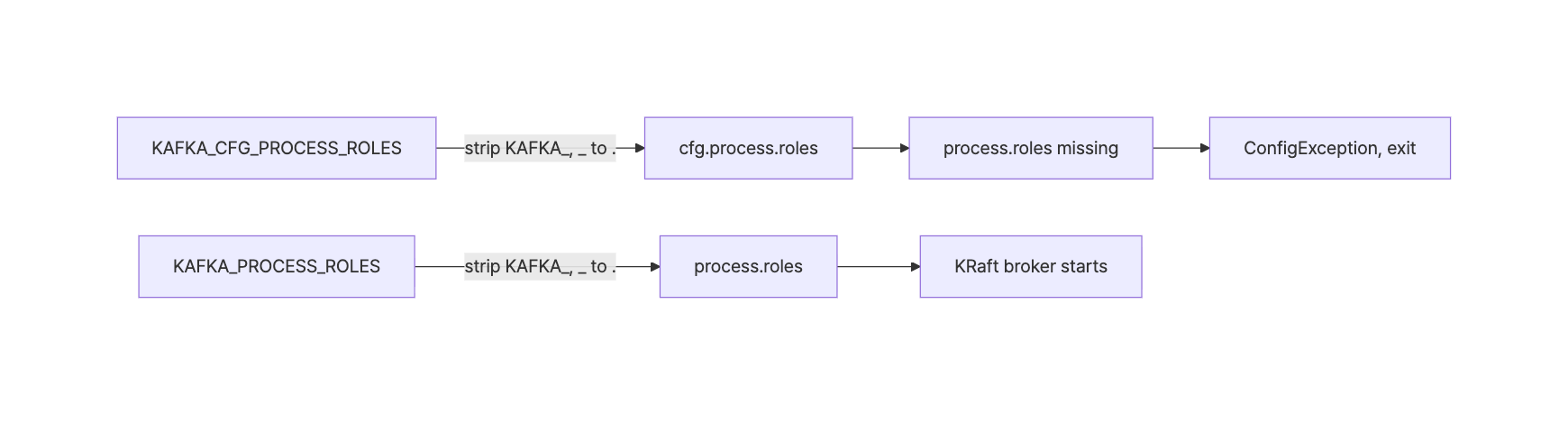
Here’s the naming rule as a table. If a property name contains _ or -, write it as __ or ___ respectively.
| Kafka property | Bitnami variable | apache/kafka variable |
|---|---|---|
process.roles |
KAFKA_CFG_PROCESS_ROLES |
KAFKA_PROCESS_ROLES |
node.id |
KAFKA_CFG_NODE_ID |
KAFKA_NODE_ID |
controller.quorum.voters |
KAFKA_CFG_CONTROLLER_QUORUM_VOTERS |
KAFKA_CONTROLLER_QUORUM_VOTERS |
advertised.listeners |
KAFKA_CFG_ADVERTISED_LISTENERS |
KAFKA_ADVERTISED_LISTENERS |
The Compose file in the Stack Overflow question also had variables like KAFKA_ENABLE_KRAFT and ALLOW_PLAINTEXT_LISTENER. Neither appears in the Kafka Docker docs or examples. I dropped them all from the fixed Compose file below.
Fix: rewrite the single-node KRaft Compose file with the KAFKA_ prefix
I renamed KAFKA_CFG_ to KAFKA_ and, since the image defaults go away, set every value the broker needs. There are three listeners, one per purpose.
name: docker-bitnami-kafka-manifest-unknown-apache-kafka-kraft
services:
  kafka:
    image: 'apache/kafka:4.4.0'
    hostname: kafka
    ports:
      - '39092:9092'   # host clients -> EXTERNAL listener
    environment:
      KAFKA_NODE_ID: 1
      KAFKA_PROCESS_ROLES: broker,controller
      KAFKA_LISTENERS: INTERNAL://:19092,EXTERNAL://:9092,CONTROLLER://:9093
      KAFKA_ADVERTISED_LISTENERS: INTERNAL://kafka:19092,EXTERNAL://localhost:39092
      KAFKA_LISTENER_SECURITY_PROTOCOL_MAP: INTERNAL:PLAINTEXT,EXTERNAL:PLAINTEXT,CONTROLLER:PLAINTEXT
      KAFKA_INTER_BROKER_LISTENER_NAME: INTERNAL
      KAFKA_CONTROLLER_LISTENER_NAMES: CONTROLLER
      KAFKA_CONTROLLER_QUORUM_VOTERS: 1@kafka:9093
      KAFKA_OFFSETS_TOPIC_REPLICATION_FACTOR: 1
      KAFKA_TRANSACTION_STATE_LOG_REPLICATION_FACTOR: 1
      KAFKA_TRANSACTION_STATE_LOG_MIN_ISR: 1
      KAFKA_GROUP_INITIAL_REBALANCE_DELAY_MS: 0
KAFKA_PROCESS_ROLES: broker,controller: combined mode, where one container acts as both broker and controllerKAFKA_CONTROLLER_QUORUM_VOTERS: the format isnodeId@host:controllerPort. It uses the service namekafkaKAFKA_OFFSETS_TOPIC_REPLICATION_FACTOR: 1: without it, Kafka’s default of 3 applies. With a single broker you have to lower it to 1
I also added a healthcheck so docker compose up --wait has something to wait for. It sends a real request to the INTERNAL listener with kafka-broker-api-versions.sh, which ships in the image.
    healthcheck:
      test: ["CMD-SHELL", "/opt/kafka/bin/kafka-broker-api-versions.sh --bootstrap-server kafka:19092 > /dev/null 2>&1"]
      interval: 5s
      timeout: 10s
      retries: 12
      start_period: 10s
This time the container reaches healthy, and the logs show process.roles set correctly.
$ docker compose ps --format 'table {{.Service}}\t{{.Image}}\t{{.Status}}\t{{.Ports}}'
SERVICE   IMAGE                STATUS                   PORTS
kafka     apache/kafka:4.4.0   Up 7 seconds (healthy)   0.0.0.0:39092->9092/tcp, [::]:39092->9092/tcp
$ docker compose logs kafka | grep -E 'Kafka Server started|process.roles|advertised.listeners'
kafka-1  | 	advertised.listeners = [INTERNAL://kafka:19092, EXTERNAL://localhost:39092]
kafka-1  | 	process.roles = [broker, controller]
...
kafka-1  | [2026-10-28 09:15:14,172] INFO [KafkaRaftServer nodeId=1] Kafka Server started (kafka.server.KafkaRaftServer)
Why advertised.listeners needs separate container and host addresses
A Kafka client doesn’t keep talking to the address it first connected to. It reconnects to the advertised.listeners address the broker returns in its metadata. So each place a client connects from needs its own advertised address.
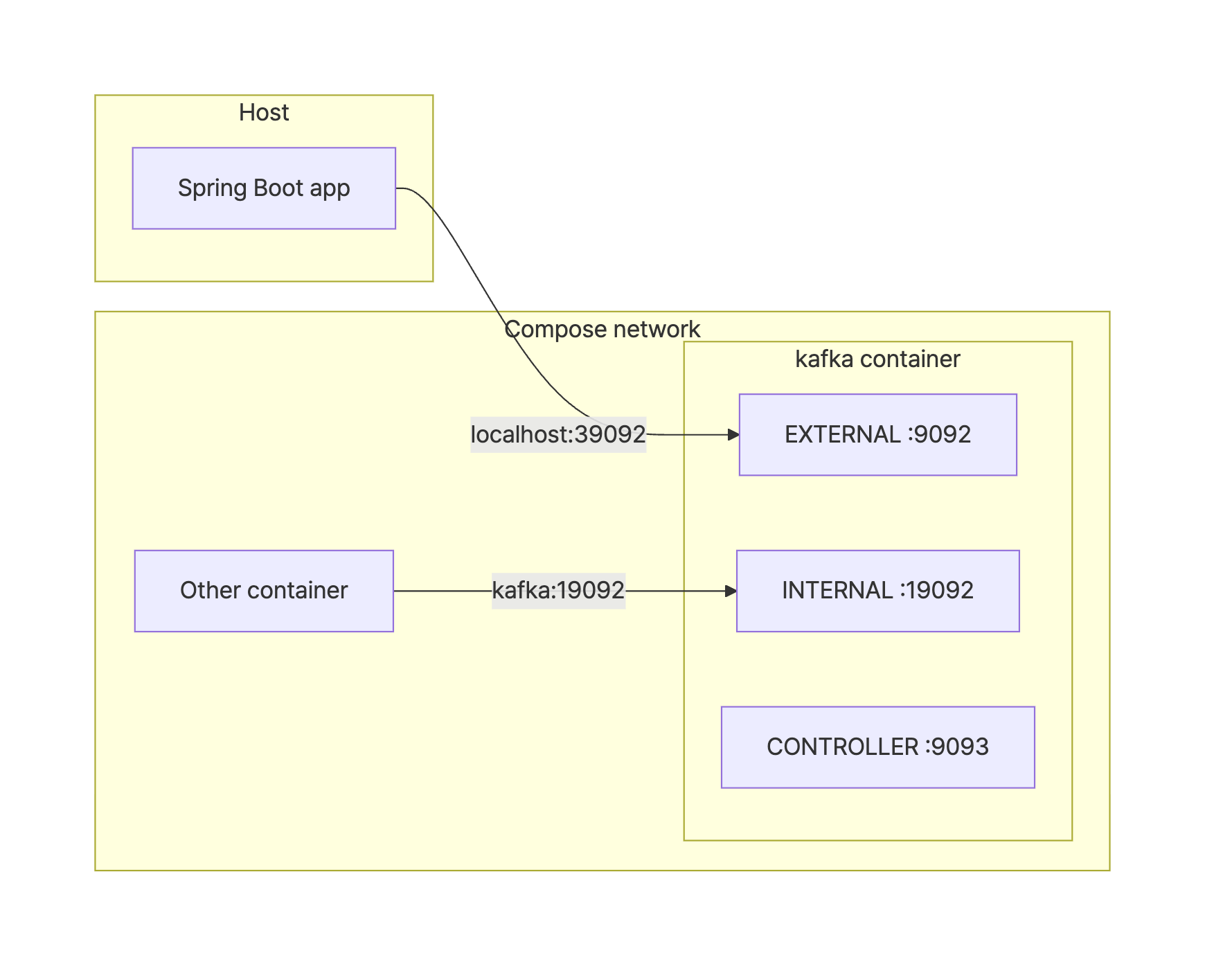
I checked what happens when a client picks the wrong listener. From another container on the same Compose network, I connected to the EXTERNAL listener (kafka:9092).
$ docker run --rm --network docker-bitnami-kafka-manifest-unknown-apache-kafka-kraft_default -v ./client-timeout.properties:/tmp/c.properties apache/kafka:4.4.0 /opt/kafka/bin/kafka-topics.sh --bootstrap-server kafka:9092 --command-config /tmp/c.properties --list
[2026-10-28 09:01:12,699] WARN [AdminClient clientId=adminclient-1] Connection to node 1 (localhost/127.0.0.1:39092) could not be established. Node may not be available. (org.apache.kafka.clients.NetworkClient)
...
Error while executing topic command : Timed out waiting for a node assignment. Call: listTopics
The first connection succeeded, but the reconnect to the advertised localhost:39092 failed. Inside a container, localhost is the container itself, and nothing listens on that port. Pointing the same container at the INTERNAL listener kafka:19092 works right away.
$ docker run --rm --network docker-bitnami-kafka-manifest-unknown-apache-kafka-kraft_default -v ./client-timeout.properties:/tmp/c.properties apache/kafka:4.4.0 /opt/kafka/bin/kafka-topics.sh --bootstrap-server kafka:19092 --command-config /tmp/c.properties --create --topic orders --partitions 1 --replication-factor 1
Created topic orders.
exit=0
This is also why the Bitnami Compose file in the Stack Overflow question split its addresses as CLIENT://kafka:29092,EXTERNAL://localhost:9092. If you collapse that into a single localhost address while renaming the variables, other services in the same Compose project can’t connect.
Verify with a Spring Boot 4.1.2 producer and consumer
An app running on the host uses the EXTERNAL address localhost:39092. The only Kafka dependency in pom.xml is spring-boot-starter-kafka.
spring:
  kafka:
    bootstrap-servers: localhost:39092   # EXTERNAL listener published on the host
    consumer:
      group-id: demo-group
      auto-offset-reset: earliest
The listener puts each received message on a queue, and a NewTopic bean creates the topic.
@Component
public class DemoEventListener {

    private final BlockingQueue<String> received = new LinkedBlockingQueue<>();

    @Bean
    static NewTopic demoEventsTopic() {
        return TopicBuilder.name("demo-events").partitions(1).replicas(1).build();
    }

    @KafkaListener(topics = "demo-events")
    void onMessage(String message) {
        received.add(message);
    }

    public BlockingQueue<String> received() {
        return received;
    }
}
The test sends one record with KafkaTemplate and checks that the same value comes out of the listener’s queue.
@Test
void sendAndReceive() throws Exception {
    SendResult<String, String> result =
            kafkaTemplate.send("demo-events", "order-1", "hello kraft").get(10, TimeUnit.SECONDS);
    System.out.println("sent: partition=" + result.getRecordMetadata().partition()
            + ", offset=" + result.getRecordMetadata().offset());

    String message = listener.received().poll(20, TimeUnit.SECONDS);
    System.out.println("received: " + message);
    assertThat(message).isEqualTo("hello kraft");
}
Here’s the output of mvn -B test. The broker runs 4.4.0 while the client is kafka-clients 4.2.2, the version Spring Boot 4.1.2 manages, and the round trip works.
$ mvn -B test
...
sent: partition=0, offset=0
received: hello kraft
[INFO] Tests run: 1, Failures: 0, Errors: 0, Skipped: 0, Time elapsed: 3.408 s -- in com.example.kafkademo.KafkaRoundTripTest
...
[INFO] BUILD SUCCESS
The test log also prints rebalance failed due to 'This is not the correct coordinator.' (NotCoordinatorException) a few times at INFO level. In this run, partitions assigned: [demo-events-0] appeared about half a second later, and the test passed.
Pitfalls when migrating from bitnami/kafka
- Host port: this post uses
39092. If another Kafka already holds9092, change the port in bothportsand theEXTERNALadvertised address. Changing only one gives you the samenode assignmenttimeout shown above - Image tag: pin a version like
4.4.0instead ofapache/kafka:latest. As of 2026-10-28, Docker Hub showslatestlast updated on 2026-06-24, while4.4.0was pushed on 2026-10-22 and4.3.2on 2026-10-20. Don’t assumelatestpoints to the newest release - Startup check: a container in
Updoesn’t mean the broker accepts requests. Check with a real request like the healthcheck above, and usedocker compose up --waitto wait untilhealthy - Where the error shows up: the
process.roleserror appears only in the container logs, not in theupoutput. Even whenupexits with 0, rundocker compose ps -aand look forExited (1)
Summary
manifest for bitnami/kafka:... not found: manifest unknownmeans the tag is gone from Docker Hub. On Docker Desktop 29.9.2 (containerd image store), it shows up asfailed to resolve reference ... not found- The old tags still live in
bitnamilegacy/kafka, but that’s a temporary repository that no longer gets updates apache/kafkamaps whatever followsKAFKA_straight to a property name, soKAFKA_CFG_PROCESS_ROLESbecomescfg.process.rolesand you get theprocess.roleserror- Passing even one environment variable drops the image defaults, so set the node ID, roles, listeners, quorum voters, and replication factors explicitly
- Splitting listeners into
INTERNAL(kafka:19092) andEXTERNAL(localhost:39092) lets both containers and the host app connect
References
- Upcoming changes to the Bitnami catalog (bitnami/containers #83267)
- apache/kafka – Docker Hub
- bitnamilegacy/kafka – Docker Hub
- Apache Kafka 4.4 Documentation – Docker
- apache/kafka docs/getting-started/docker.md (environment variable naming)
- apache/kafka Docker examples README
- Unable to Pull Bitnami Kafka docker Image (404 Not Found) – Stack Overflow
- Kafka error in docker-compose: Missing required configuration "process.roles" – Stack Overflow