You upgrade Docker to 29, and suddenly every Testcontainers test fails before a single container starts. The log shows UnixSocketClientProviderStrategy: failed with exception BadRequestException followed by client version 1.32 is too old. Minimum supported API version is 1.44. Your test code didn’t change, which makes the cause hard to spot.
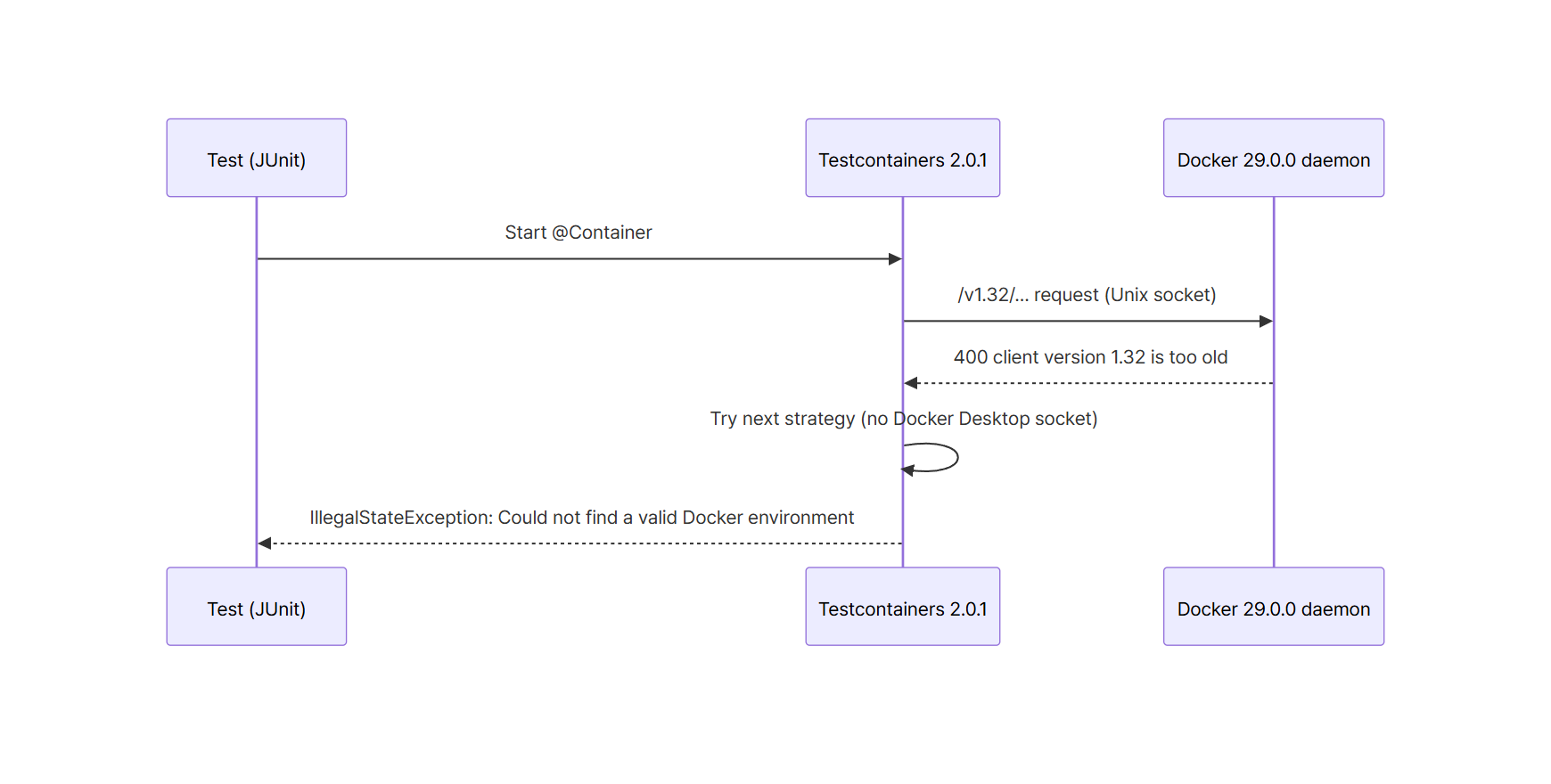
A Docker 29.0.0 daemon rejects requests below API 1.44 with a 400, and Testcontainers 2.0.1 and 1.21.3 connect with API 1.32.
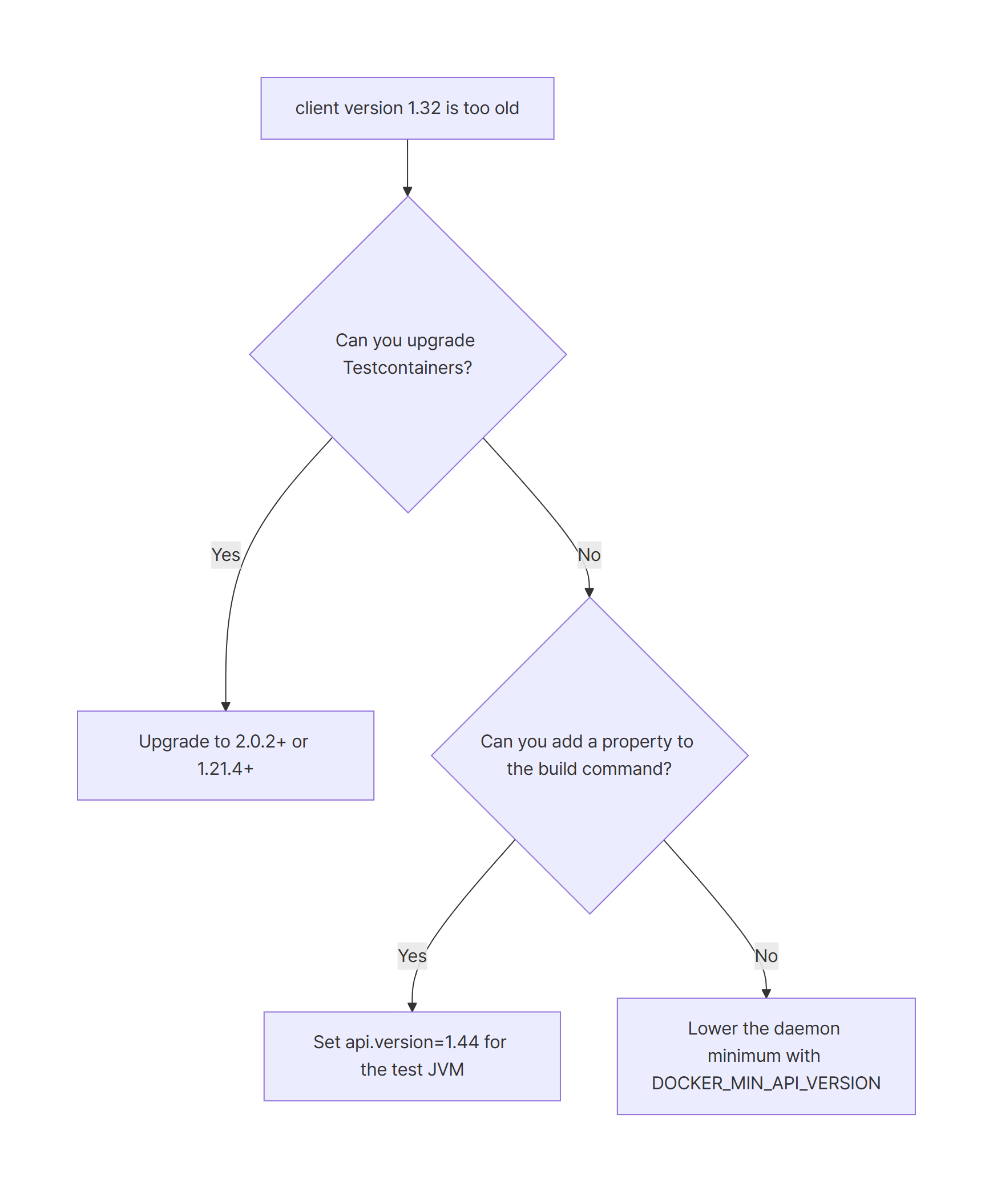
Upgrade Testcontainers to 2.0.2 or later (1.21.4 or later on 1.x). I confirmed that all four versions from 2.0.2 to 2.0.5 pass.
If you can’t upgrade yet,-Dapi.version=1.44or the daemon’sDOCKER_MIN_API_VERSIONgets you through, but treat both as stopgaps.
Environment
To match a Linux host, I ran Docker 29.0.0 as a docker:29.0.0-dind container. A Maven container shares that daemon’s /var/run/docker.sock and runs the tests. I also ran the same test separately against Docker Desktop 29.9.2 on Windows for comparison.
| Item | Version |
|---|---|
| Docker Engine (reproduction target) | 29.0.0, API 1.52 (minimum version 1.44) |
| Docker Desktop (comparison) | Engine 29.9.2, API 1.56 (minimum 1.40) |
| JDK | 21.0.12.1 (Temurin) |
| Maven | 3.10.0 |
| Testcontainers 2.x | 2.0.1 (reproduction), 2.0.2, 2.0.3, 2.0.4, 2.0.5 (final) |
| Testcontainers 1.x | 1.21.3 (reproduction), 1.21.4 |
| PostgreSQL image | postgres:17.6-alpine |
Reproduce: Testcontainers 2.0.1 fails with BadRequestException on Docker 29.0.0
The lab puts the Docker daemon and the Maven runner in one Compose file. The docker service shares /var/run through a volume, so Testcontainers connects over the Unix socket exactly like it would on a Linux host.
services:
  docker:
    image: docker:29.0.0-dind
    privileged: true
    environment:
      DOCKER_TLS_CERTDIR: ""
    volumes:
      - docker-sock:/var/run
    healthcheck:
      test: ["CMD", "docker", "info"]
      interval: 2s
      timeout: 5s
      retries: 30

  maven:
    image: maven:3.10.0-eclipse-temurin-21
    network_mode: "service:docker"
    working_dir: /app
    environment:
      # mapped ports are published inside the dind network namespace
      TESTCONTAINERS_HOST_OVERRIDE: localhost
    volumes:
      - .:/app
      - ./.tools/m2:/root/.m2
      - docker-sock:/var/run
    depends_on:
      docker:
        condition: service_healthy

volumes:
  docker-sock:
healthcheck and depends_on hold the tests back until the dind daemon answers docker info. Without them, the tests could start before the daemon is up, and you’d get connection failures that have nothing to do with the API version.
network_mode: "service:docker" lets the Maven container reach the mapped ports of Testcontainers-managed containers on localhost. On a real Linux host you don’t need any of this; Testcontainers just uses /var/run/docker.sock.
The test starts a PostgreSQL container and runs select version() once. That’s all.
@Testcontainers
class PostgresContainerTest {

    @Container
    static PostgreSQLContainer postgres = new PostgreSQLContainer("postgres:17.6-alpine");

    @Test
    void selectVersion() throws Exception {
        try (Connection conn = DriverManager.getConnection(
                postgres.getJdbcUrl(), postgres.getUsername(), postgres.getPassword());
             ResultSet rs = conn.createStatement().executeQuery("select version()")) {
            rs.next();
            String version = rs.getString(1);
            System.out.println("DB version: " + version);
            assertTrue(version.startsWith("PostgreSQL 17"));
        }
    }
}
In Testcontainers 2.x, the PostgreSQL module lives in the org.testcontainers.postgresql package. The 1.x comparison project uses org.testcontainers.containers.PostgreSQLContainer instead.
Pin Testcontainers to 2.0.1 and the run fails before any container is created.
docker compose run --rm maven mvn -B -f tc2/pom.xml -Dtestcontainers.version=2.0.1 test
[main] INFO org.testcontainers.DockerClientFactory - Testcontainers version: 2.0.1
[main] ERROR org.testcontainers.dockerclient.DockerClientProviderStrategy - Could not find a valid Docker environment. Please check configuration. Attempted configurations were:
	UnixSocketClientProviderStrategy: failed with exception BadRequestException (Status 400: {"message":"client version 1.32 is too old. Minimum supported API version is 1.44, please upgrade your client to a newer version"}
)
	DockerDesktopClientProviderStrategy: failed with exception NullPointerException (Cannot invoke "java.nio.file.Path.toString()" because the return value of "org.testcontainers.dockerclient.DockerDesktopClientProviderStrategy.getSocketPath()" is null)As no valid configuration was found, execution cannot continue.
...
java.lang.IllegalStateException: Could not find a valid Docker environment. Please see logs and check configuration
	at org.testcontainers.dockerclient.DockerClientProviderStrategy.lambda$getFirstValidStrategy$7(DockerClientProviderStrategy.java:274)
...
[ERROR] Tests run: 1, Failures: 0, Errors: 1, Skipped: 0
The exception ends with IllegalStateException: Could not find a valid Docker environment, so it’s easy to assume Docker isn’t running. The real cause is the 400 response on the UnixSocketClientProviderStrategy line just above it. The NullPointerException from DockerDesktopClientProviderStrategy below that only means there’s no Docker Desktop socket on Linux. You can ignore it.
The 1.x line behaves the same way. With Testcontainers 1.21.3, the UnixSocketClientProviderStrategy line prints the same client version 1.32 is too old message and the build ends in BUILD FAILURE.
Cause: Docker 29.0.0 raised the minimum API version to 1.44
The Docker 29.0.0 release notes include daemon: raise minimum API version to v1.44 (moby/moby#51186). Before that, the daemon accepted API versions down to 1.24. The daemon in the lab reports the new minimum in docker version.
Server: Docker Engine - Community
 Engine:
  Version:          29.0.0
  API version:      1.52 (minimum version 1.44)
When the docker-java configuration has no API version set, Testcontainers 2.0.1 fills in RemoteApiVersion.VERSION_1_32 as the default. PR #11216, which shipped in 2.0.2, changes that default to VERSION_1_44. In other words, Testcontainers doesn’t negotiate a version with the daemon. It puts a fixed version in the request path.
To confirm that the daemon rejects requests based on the API version alone, I sent two curl requests to the same socket. /v1.32/version returns a 400 with the same message as the test log.
docker compose run --rm --no-deps maven curl -sS -i --unix-socket /var/run/docker.sock http://localhost/v1.32/version
HTTP/1.1 400 Bad Request
Api-Version: 1.52
Content-Type: application/json
Ostype: linux
Server: Docker/29.0.0 (linux)
...
{"message":"client version 1.32 is too old. Minimum supported API version is 1.44, please upgrade your client to a newer version"}
Change only the path to /v1.44/_ping, and the daemon returns HTTP/1.1 200 OK with a body of OK. The test code and the image don’t matter here. The API version the client puts in the path decides the outcome.
On Docker Desktop, Status 400 is followed by empty JSON
Docker Desktop shows a different error. When I ran the same 2.0.1 test against Docker Desktop on Windows (Engine 29.9.2), NpipeSocketClientProviderStrategy failed. The response body has no too old text, only JSON with empty values.
[main] INFO org.testcontainers.DockerClientFactory - Testcontainers version: 2.0.1
[main] ERROR org.testcontainers.dockerclient.DockerClientProviderStrategy - Could not find a valid Docker environment. Please check configuration. Attempted configurations were:
	NpipeSocketClientProviderStrategy: failed with exception BadRequestException (Status 400: {"ID":"","Containers":0,"ContainersRunning":0,"ContainersPaused":0,"ContainersStopped":0,"Images":0,"Driver":"", ... "Labels":["com.docker.desktop.address=npipe://\\\\.\\pipe\\docker_cli"], ... "Warnings":null})As no valid configuration was found, execution cannot continue.
The API version is still the cause. On the same Docker Desktop, adding only -Dapi.version=1.44 to the 2.0.1 run made it pass, and upgrading to 2.0.5 passed too. If you see an error that starts with Status 400: {"ID":"",...}, check your Testcontainers version first.
The Docker 29.3.0 release notes include Lower minimum API version from v1.44 to v1.40 (Docker 19.03). The 29.9.2 host engine did report a minimum of 1.40. But 1.32 is lower than 1.40, too. So moving Docker to a 29.x release after 29.3 doesn’t save Testcontainers 2.0.1 or 1.21.3. Waiting for Docker to relax the limit isn’t a fix.
Fix: upgrade to Testcontainers 2.0.2+ (or 1.21.4+ on 1.x)
Upgrading Testcontainers is the reliable fix. The 2.0.2 release notes list Set default docker API version to 1.44 (#11216), and the 1.21.4 release notes say This release makes version 1.21.x works with recent Docker Engine changes. The lab pom.xml manages the BOM version with a single property.
<properties>
    <maven.compiler.release>21</maven.compiler.release>
    <project.build.sourceEncoding>UTF-8</project.build.sourceEncoding>
    <!-- 2.0.1 fails on Docker 29.0.0, 2.0.2+ works -->
    <testcontainers.version>2.0.5</testcontainers.version>
</properties>

<dependencyManagement>
    <dependencies>
        <dependency>
            <groupId>org.testcontainers</groupId>
            <artifactId>testcontainers-bom</artifactId>
            <version>${testcontainers.version}</version>
            <type>pom</type>
            <scope>import</scope>
        </dependency>
The module dependencies (testcontainers-postgresql, testcontainers-junit-jupiter) have no version of their own and inherit it from the BOM. That leaves exactly one line to change.
Here are the results per version against the Docker 29.0.0 daemon:
| Testcontainers | Result |
|---|---|
| 1.21.3 | Fails — client version 1.32 is too old |
| 1.21.4 | Passes |
| 2.0.1 | Fails — client version 1.32 is too old |
| 2.0.2 | Passes |
| 2.0.3 | Passes |
| 2.0.4 | Passes |
| 2.0.5 | Passes |
With 2.0.5, Testcontainers finds the Unix socket and reads the server version.
[main] INFO org.testcontainers.DockerClientFactory - Testcontainers version: 2.0.5
[main] INFO org.testcontainers.dockerclient.DockerClientProviderStrategy - Found Docker environment with local Unix socket (unix:///var/run/docker.sock)
[main] INFO org.testcontainers.DockerClientFactory - Docker host IP address is localhost
[main] INFO org.testcontainers.DockerClientFactory - Connected to docker:
  Server Version: 29.0.0
  API Version: 1.52
...
DB version: PostgreSQL 17.6 on x86_64-pc-linux-musl, compiled by gcc (Alpine 14.2.0) 14.2.0, 64-bit
...
[INFO] Tests run: 1, Failures: 0, Errors: 0, Skipped: 0
[INFO] BUILD SUCCESS
Projects that use the Spring Boot BOM
Many Spring Boot projects never set a Testcontainers version directly. In that case the testcontainers.version managed by Spring Boot decides. I checked the value in each spring-boot-dependencies POM on Maven Central.
| Spring Boot | Managed Testcontainers | Docker 29 |
|---|---|---|
| 3.5.7, 3.5.8 | 1.21.3 | Failing version |
| 3.5.9 to 3.5.16 | 1.21.4 | Passing version |
| 4.0.0 | 2.0.2 | Passing version |
| 4.0.1 to 4.0.3 | 2.0.3 | Passing version |
| 4.0.4, 4.0.5 | 2.0.4 | Passing version |
| 4.0.6 to 4.0.9, 4.1.0 to 4.1.2 | 2.0.5 | Passing version |
I ran every Testcontainers version in the table (1.21.3, 1.21.4, 2.0.2 to 2.0.5) with the same test against the Docker 29.0.0 daemon. I didn’t start an actual Spring Boot project, so the right-hand column is the result for that Testcontainers version.
If you’re stuck on Spring Boot 3.5.7 or 3.5.8 with spring-boot-starter-parent, override just the <testcontainers.version> property with 1.21.4 in your pom.xml. The Spring Boot Maven Plugin documentation describes this way of changing an individual dependency version through a property. If you import spring-boot-dependencies instead of using the parent, the property has no effect. In that case, import the Testcontainers BOM before spring-boot-dependencies.
Workarounds when you can’t upgrade yet, and their risks
Sometimes you can’t bump a library right away. The approval process may be slow, or you may just need to build an old branch once. I verified two workarounds in the lab.
Client side: the api.version system property
The code in PR #11216 only applies the hardcoded default when the docker-java configuration has no API version. The docker-java docs say you can set api.version as a system property, in $HOME/.docker-java.properties, or in a docker-java.properties file on the classpath. I kept Testcontainers at 2.0.1 and passed only the property to Maven.
docker compose run --rm maven mvn -B -f tc2/pom.xml -Dtestcontainers.version=2.0.1 -Dapi.version=1.44 test
[main] INFO org.testcontainers.DockerClientFactory - Testcontainers version: 2.0.1
[main] INFO org.testcontainers.dockerclient.DockerClientProviderStrategy - Found Docker environment with local Unix socket (unix:///var/run/docker.sock)
...
DB version: PostgreSQL 17.6 on x86_64-pc-linux-musl, compiled by gcc (Alpine 14.2.0) 14.2.0, 64-bit
[INFO] Tests run: 1, Failures: 0, Errors: 0, Skipped: 0, Time elapsed: 18.44 s -- in com.example.tcapi.PostgresContainerTest
The -Dapi.version=1.44 on the command line reached the test JVM, and the test passed. I only verified the Maven command-line approach. If you run tests straight from your IDE, the docker-java docs describe putting api.version=1.44 in $HOME/.docker-java.properties. Every machine needs its own copy of that file, so it’s awkward to roll out to a whole team. Either way, it’s a stopgap until you upgrade.
Daemon side: the DOCKER_MIN_API_VERSION environment variable
The description of moby/moby#51186 says that starting the daemon with the DOCKER_MIN_API_VERSION environment variable restores an older minimum. In the lab, I set it on the dind daemon with a Compose override file.
# Workaround only: lower the daemon minimum API version again
services:
  docker:
    environment:
      DOCKER_MIN_API_VERSION: "1.24"
After restarting the daemon with this override, docker version --format {{.Server.MinAPIVersion}} prints 1.24. Testcontainers 2.0.1 then passed with BUILD SUCCESS. When I recreated the daemon without the override, the same command printed 1.44 again.
I still don’t recommend this. The same PR description calls API versions below 1.44 "best effort" and says the compatibility code may be trimmed later. Changing one daemon also affects every client that talks to it. And you’d have to change the Docker setup on every teammate’s machine and every CI runner.
| Approach | What you change | Blast radius | Verdict |
|---|---|---|---|
| Testcontainers 2.0.2+ / 1.21.4+ | One line in pom.xml |
That project | The real fix |
-Dapi.version=1.44 |
Build command, CI script | That build only | Temporary, until you upgrade |
DOCKER_MIN_API_VERSION |
Docker daemon | Every client of that daemon | Last resort |
Summary
- Docker 29.0.0 raised the daemon’s minimum API version to 1.44. Testcontainers 2.0.1 and 1.21.3 request 1.32, so they get a
BadRequestException - The final exception is
Could not find a valid Docker environment, which looks like Docker is down. The real cause isclient version 1.32 is too oldon the strategy line above it - On Docker Desktop, it shows up as empty JSON like
Status 400: {"ID":"",...}. Since 29.3.0 the minimum is 1.40, but 1.32 is still rejected - The fix is Testcontainers 2.0.2 or later (1.21.4 or later on 1.x). Spring Boot 3.5.9 to 3.5.16 and 4.0.0 to 4.1.2 (the range I checked in the POMs) manage a fixed version
-Dapi.version=1.44andDOCKER_MIN_API_VERSIONare temporary workarounds until you upgrade
References
- testcontainers-java #11212: Docker 29.0.0 could not find a valid Docker environment
- testcontainers-java PR #11216: Set default docker API version to 1.44
- Testcontainers for Java 2.0.2 release
- Testcontainers for Java 1.21.4 release
- Docker Engine 29 release notes
- moby/moby PR #51186: daemon: raise default minimum API version to v1.44
- moby/moby PR #52067: Add compatibility with API v1.40 and up
- docker-java Getting Started: Configuration
- Spring Boot Maven Plugin: Using the Plugin
- Stack Overflow: Sudden Docker error about "client API version"