You bump the Liquibase Gradle plugin from 2.2.2 to 3.0.x, and gradle update fails before Liquibase even starts. The Gradle CLI prints only two lines: liquibase/Scope and > liquibase.Scope. In IntelliJ projects, the same problem has been reported as Unable to load class 'liquibase.Scope'.
Starting with plugin 3.0,
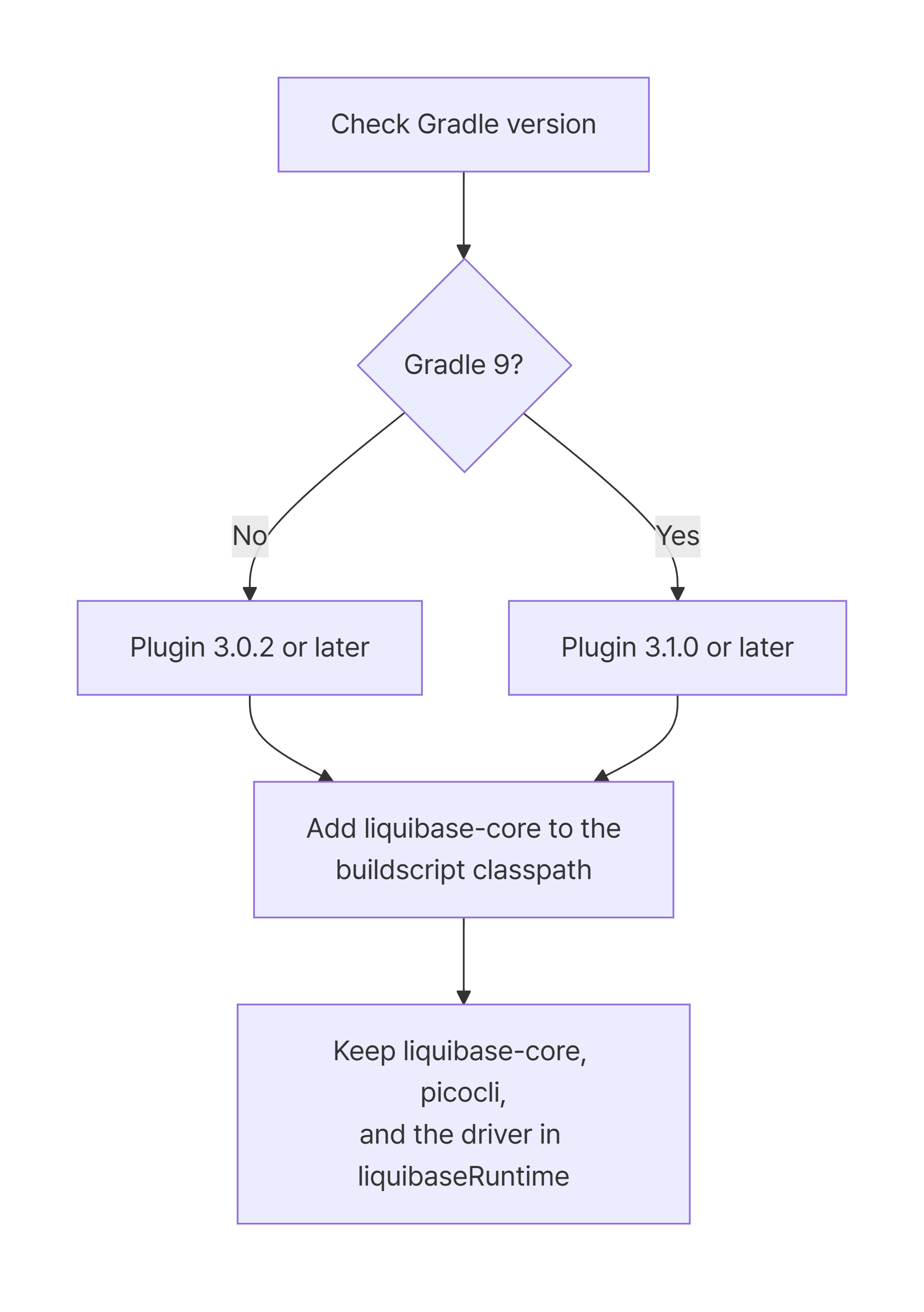
liquibase-coremust be on thebuildscriptclasspath, not only inliquibaseRuntime.
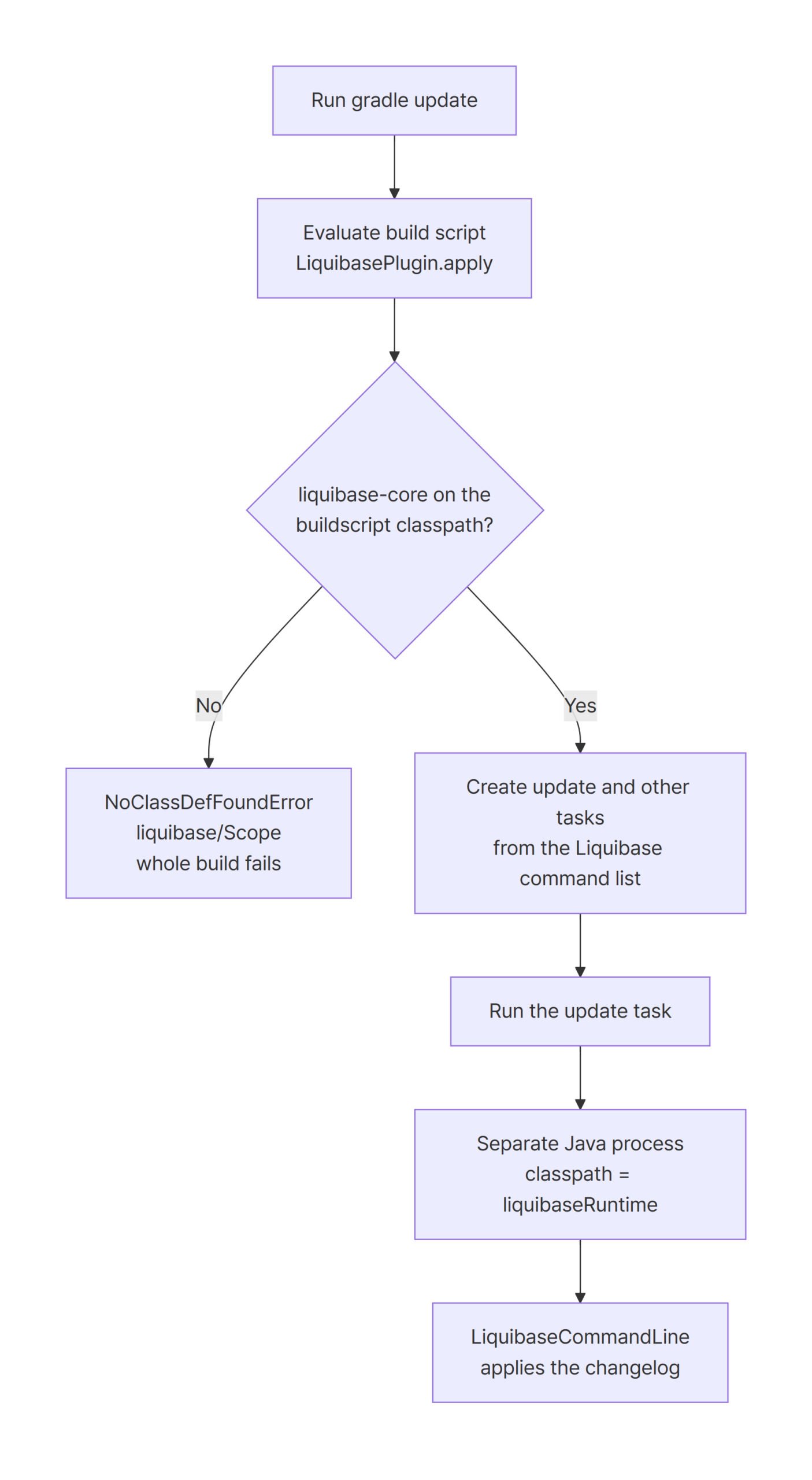
The plugin calls intoliquibase.Scopethe moment it’s applied, to read Liquibase’s command list and create tasks.
On Gradle 9, 3.0.2 still fails with anexec()error, so use plugin 3.1.0 or later together with thebuildscriptblock.
Environment
| Item | Version |
|---|---|
| JDK | 21.0.12.1 (Temurin) |
| Gradle (reproduction and comparison) | 8.14.6 |
| Gradle (latest) | 9.8.2 |
| liquibase-gradle-plugin | 2.2.2 / 3.0.2 / 3.1.0 |
| liquibase-core | 5.0.4 |
| picocli | 4.7.7 |
| H2 | 2.4.240 |
I ran the same changelog, a single changeSet that creates an ORDERS table, and changed only the plugin setup between projects. The database is an H2 file database. The failure is a class loading problem during plugin application, so the database type doesn’t matter.
Gradle wasn’t installed system-wide. I downloaded the distribution zips and ran each project with them directly. Every command used --no-daemon --console=plain.
Reproduce: gradle update works on 2.2.2 and fails on 3.0.2 with liquibase.Scope
The starting point is Gradle 8.14.6 with plugin 2.2.2. Following the 2.2.1 usage guide, Liquibase and the JDBC driver go only into liquibaseRuntime.
plugins {
    id 'java'
    id 'org.liquibase.gradle' version '2.2.2'
}

dependencies {
    liquibaseRuntime 'org.liquibase:liquibase-core:5.0.4'
    liquibaseRuntime 'info.picocli:picocli:4.7.7'
    liquibaseRuntime 'com.h2database:h2:2.4.240'
}
This is an excerpt from build.gradle. The main activity in the liquibase block only sets changelogFile, searchPath, and the H2 connection details. With this setup, gradle update applies the one changeSet and finishes.
$ cd plugin-2.2.2 && ../.tools/gradle-8.14.6/bin/gradle update --no-daemon --console=plain
...
> Task :update
liquibase-plugin: Running the 'main' activity...
...
Running Changeset: db/changelog.xml::1::example
...
UPDATE SUMMARY
Run:                          1
...
Liquibase command 'update' was executed successfully.
...
BUILD SUCCESSFUL in 9s
Now change only the plugin version in the plugins block to 3.0.2. Every other line stays the same.
plugins {
    id 'java'
    id 'org.liquibase.gradle' version '3.0.2'
}
The same command fails right away. Notice that there’s no > Task :update line in the output. Gradle stopped while evaluating the build script, before it got to run any task.
$ cd plugin-3.0.2 && ../.tools/gradle-8.14.6/bin/gradle update --no-daemon --console=plain
...
FAILURE: Build failed with an exception.

* What went wrong:
liquibase/Scope
> liquibase.Scope

* Try:
> Run with --stacktrace option to get the stack trace.
...
BUILD FAILED in 6s
That message doesn’t tell you much. It doesn’t even name an exception type. Run it again with --stacktrace and the real exception shows up.
$ cd plugin-3.0.2 && ../.tools/gradle-8.14.6/bin/gradle update --no-daemon --console=plain --stacktrace
...
* Exception is:
java.lang.NoClassDefFoundError: liquibase/Scope
	at org.liquibase.gradle.ArgumentBuilder.initializeGlobalArguments(ArgumentBuilder.groovy:61)
	at org.liquibase.gradle.ArgumentBuilder$initializeGlobalArguments.call(Unknown Source)
	at org.liquibase.gradle.LiquibasePlugin.applyTasks(LiquibasePlugin.groovy:61)
	at org.liquibase.gradle.LiquibasePlugin$applyTasks$1.callCurrent(Unknown Source)
	at org.liquibase.gradle.LiquibasePlugin.apply(LiquibasePlugin.groovy:33)
...
Caused by: java.lang.ClassNotFoundException: liquibase.Scope
LiquibasePlugin.apply calls ArgumentBuilder.initializeGlobalArguments, and that call can’t find liquibase.Scope. This happens even though liquibaseRuntime clearly declares liquibase-core:5.0.4. The class is in the project, just not where the plugin looks for it.
Cause: plugin 3.0 looks for Liquibase on the buildscript classpath at apply time
Gradle loads plugin code from the build script classpath. Only jars that arrive through plugins { id ... } or buildscript { dependencies { classpath ... } } are visible there. liquibaseRuntime, on the other hand, is an ordinary configuration that the plugin creates. It’s used only as the classpath of the separate Java process that runs Liquibase.
Plugin 2.2.2 worked with liquibaseRuntime alone, as the first run showed. According to the plugin’s release notes, starting with 3.0.0 the plugin gets the list of tasks to create from Liquibase itself. That’s why Liquibase now has to be on the buildscript classpath as well as in liquibaseRuntime. The ArgumentBuilder.initializeGlobalArguments frame in the stack trace is exactly that lookup.
It breaks every task, not just Liquibase tasks
Because the error happens while the plugin is applied, it isn’t limited to Liquibase tasks. Running gradle tasks, which has nothing to do with Liquibase, fails the same way in the same project.
$ cd plugin-3.1.0 && ../.tools/gradle-9.8.2/bin/gradle tasks --no-daemon --console=plain
...
* What went wrong:
liquibase/Scope
> liquibase.Scope
...
BUILD FAILED in 5s
Since configuration fails, build, test, and every other task stop running too. The IntelliJ project in the Stack Overflow question hit this error right after changing only the plugin version. If you see it, there’s no need to suspect your application code or database settings first. Look at the plugin version and the buildscript block.
Fix: add liquibase-core to buildscript, and use plugin 3.1.0 on Gradle 9
As in the example in the plugin’s usage guide, add liquibase-core as a classpath dependency in a buildscript block. The buildscript block has to come before the plugins block. Keep the existing liquibaseRuntime dependencies as they are.
buildscript {
    repositories {
        mavenCentral()
    }
    dependencies {
        // plugin 3.x reads Liquibase commands at apply time
        classpath 'org.liquibase:liquibase-core:5.0.4'
    }
}

plugins {
    id 'java'
    id 'org.liquibase.gradle' version '3.0.2'
}
The repositories inside buildscript is separate from the project-level repositories, so it’s declared again here. With this change, rerunning on Gradle 8.14.6 applies the changeSet just like plugin 2.2.2 did.
$ cd plugin-3.0.2-fixed && ../.tools/gradle-8.14.6/bin/gradle update --no-daemon --console=plain
...
> Task :update
liquibase-plugin: Running the 'main' activity...
...
Running Changeset: db/changelog.xml::1::example
...
Liquibase command 'update' was executed successfully.
...
BUILD SUCCESSFUL in 9s
Gradle 9 needs plugin 3.1.0
On Gradle 9, the buildscript change alone isn’t enough. Running the same plugin-3.0.2-fixed project on Gradle 9.8.2 gets past plugin application, but now fails while executing the task.
$ cd plugin-3.0.2-fixed && ../.tools/gradle-9.8.2/bin/gradle update --no-daemon --console=plain
...
> Task :update FAILED
liquibase-plugin: Running the 'main' activity...
...
* What went wrong:
Execution failed for task ':update' (registered by plugin 'org.liquibase.gradle').
> No signature of method: org.liquibase.gradle.LiquibaseTask.exec() is applicable for argument types: () values: []
  Possible solutions: exec(), exec(), every(), grep(), each(groovy.lang.Closure), every(groovy.lang.Closure)
Plugin 2.2.2 also failed with the exec() error on Gradle 9.8.2. This symptom was reported in GitHub issues #173 and #182. The plugin’s release notes say 3.1.0 (2025-12-06) added Gradle 9 support.
Upgrading to 3.1.0 doesn’t remove the need for buildscript, though. I ran plugin-3.1.0 without a buildscript block on Gradle 9.8.2, and it failed with the same liquibase.Scope error as before. Issue #178 reports the same thing for Spring Boot 4 with plugin 3.1.0. On Gradle 9 you need both changes: the plugin version and the buildscript block.
buildscript {
    repositories {
        mavenCentral()
    }
    dependencies {
        // plugin 3.x reads Liquibase commands at apply time
        classpath 'org.liquibase:liquibase-core:5.0.4'
    }
}

plugins {
    id 'java'
    id 'org.liquibase.gradle' version '3.1.0'
}

dependencies {
    liquibaseRuntime 'org.liquibase:liquibase-core:5.0.4'
    liquibaseRuntime 'info.picocli:picocli:4.7.7'
    liquibaseRuntime 'com.h2database:h2:2.4.240'
}
With this setup on Gradle 9.8.2, both update and history succeeded. The history output shows the changeSet recorded in DATABASECHANGELOG. The Update Date value is printed in the OS locale of the machine that ran the lab.
$ cd plugin-3.1.0-fixed && ../.tools/gradle-9.8.2/bin/gradle history --no-daemon --console=plain
...
> Task :history
liquibase-plugin: Running the 'main' activity...
...
Liquibase History for jdbc:h2:file:./build/h2/demo

+---------------+---------------------+------------------+------------------+--------------+-----+
| Deployment ID | Update Date         | Changelog Path   | Changeset Author | Changeset ID | Tag |
+---------------+---------------------+------------------+------------------+--------------+-----+
| 2994093517    | 26. 10. 26. 오후 2:54 | db/changelog.xml | example          | 1            |     |
+---------------+---------------------+------------------+------------------+--------------+-----+
...
Liquibase command 'history' was executed successfully.
...
BUILD SUCCESSFUL in 8s
As of 2026-10-30, the latest version in the Gradle Plugin Portal metadata is 3.1.1. I ran this lab only with 3.1.0, so if you move to 3.1.1, keep the buildscript block and run gradle tasks once to confirm it still loads.
Which plugin and Gradle combinations worked
Here are all the combinations I ran. On Gradle 8 I only ran 3.0.2 among the 3.x versions, and I ran 3.1.0 only on Gradle 9.8.2.
| Gradle | Plugin | buildscript classpath | Result |
|---|---|---|---|
| 8.14.6 | 2.2.2 | none | success |
| 8.14.6 | 3.0.2 | none | NoClassDefFoundError: liquibase/Scope |
| 8.14.6 | 3.0.2 | liquibase-core:5.0.4 |
success |
| 9.8.2 | 2.2.2 | none | LiquibaseTask.exec() error |
| 9.8.2 | 3.0.2 | liquibase-core:5.0.4 |
LiquibaseTask.exec() error |
| 9.8.2 | 3.1.0 | none | NoClassDefFoundError: liquibase/Scope |
| 9.8.2 | 3.1.0 | liquibase-core:5.0.4 |
success |
Pitfalls: buildscript and liquibaseRuntime do different jobs
Once buildscript has liquibase-core, it’s tempting to delete it from liquibaseRuntime. Don’t. In plugin-3.1.0-buildscript-only, I removed only the runtime liquibase-core and the task failed like this.
$ cd plugin-3.1.0-buildscript-only && ../.tools/gradle-9.8.2/bin/gradle update --no-daemon --console=plain
...
* What went wrong:
Execution failed for task ':update' (registered by plugin 'org.liquibase.gradle').
> Failed to query the value of task ':update' property 'liquibaseInfo'.
   > Liquibase-core was not found in the liquibaseRuntime configuration!
Mismatched versions still run, but keep them aligned
The opposite case, different versions in the two places, still ran. plugin-3.1.0-core-mismatch puts 4.33.0 on the buildscript classpath and 5.0.4 in liquibaseRuntime. The update task succeeded, and the log printed Liquibase Version: 5.0.4. The actual migration runs with the liquibaseRuntime version.
Still, per the release notes, the task list comes from the buildscript copy of Liquibase. If the two versions drift apart, commands or arguments that exist only in the newer version may not show up as tasks. Driving both from the same version variable is the safer choice. Also note that plugin 3.0.0 and later don’t support Liquibase versions older than 4.24.
Don’t drop picocli from liquibaseRuntime
picocli also has to stay in liquibaseRuntime. In the liquibase-core 5.0.4 POM, picocli is declared optional, so it doesn’t come along transitively. Without it, the Liquibase process can’t initialize its main class.
$ cd plugin-3.1.0-no-picocli && ../.tools/gradle-9.8.2/bin/gradle update --no-daemon --console=plain
...
> Task :update FAILED
liquibase-plugin: Running the 'main' activity...
...: java.lang.NoClassDefFoundError: picocli/CommandLine$Model$ArgSpec
...
> Process 'command '...\bin\java.exe'' finished with non-zero exit value 1
The Gradle failure itself only says the forked Java process exited with value 1. The NoClassDefFoundError line above it is the one that tells you picocli is missing.
commons-lang3 with newer Liquibase versions
The README says to add commons-lang3 to liquibaseRuntime for Liquibase 4.30.0 and later. In the liquibase-core 5.0.4 POM, commons-lang3 is a compile dependency. In this lab, 5.0.4 ran successfully without adding it separately. If you see a NoClassDefFoundError related to commons-lang3 on another version, add it to liquibaseRuntime as the README suggests.
Summary
- From plugin 3.0, you need
buildscript { dependencies { classpath 'org.liquibase:liquibase-core:...' } }. Without it, the whole build stops withNoClassDefFoundError: liquibase/Scope. - The CLI shows only
liquibase/Scope > liquibase.Scope, so rerun with--stacktraceto see theLiquibasePlugin.applyframe. - On Gradle 9.8.2, plugins 2.2.2 and 3.0.2 fail with the
LiquibaseTask.exec()error. Upgrade to 3.1.0 and addbuildscriptas well. - Keep
liquibase-core,picocli, and the JDBC driver inliquibaseRuntime. The migration runs with theliquibaseRuntimeversion. - Set the Liquibase version in
buildscriptandliquibaseRuntimeto the same value.
References
- liquibase-gradle-plugin README
- liquibase-gradle-plugin Usage
- liquibase-gradle-plugin Usage (Release_2.2.1)
- liquibase-gradle-plugin Releases
- Issue #156: NoClassDefFoundError: liquibase/Scope
- Issue #173: Liquibase Gradle Plugin breaks with Gradle 9
- Issue #178: plugin 3.1.0 error liquibase.Scope
- Issue #182: Liquibase Gradle Plugin incompatible with Gradle 9.3.0
- liquibase-hibernate Issue #744: Unable to load class ‘liquibase.Scope’
- Stack Overflow: Migration from liquibase gradle plugin 2.2.2 to 3.0.1
- Gradle Plugin Portal metadata: org.liquibase.gradle
- Maven Central: liquibase-core 5.0.4 POM